Introduction to Neuroimaging Data
In this tutorial we will learn the basics of the organization of data folders, and how to load, plot, and manipulate neuroimaging data in Python.
To introduce the basics of fMRI data structures, watch this short video by Martin Lindquist.
Software Packages
There are many different software packages to analyze neuroimaging data. Most of them are open source and free to use (with the exception of BrainVoyager). The most popular ones (SPM, FSL, & AFNI) have been around a long time and are where many new methods are developed and distributed. These packages have focused on implementing what they believe are the best statistical methods, ease of use, and computational efficiency. They have very large user bases so many bugs have been identified and fixed over the years. There are also lots of publicly available documentation, listserves, and online tutorials, which makes it very easy to get started using these tools.
There are also many more boutique packages that focus on specific types of preprocessing step and analyses such as spatial normalization with ANTs, connectivity analyses with the conn-toolbox, representational similarity analyses with the rsaToolbox, and prediction/classification with pyMVPA.
Many packages have been developed within proprietary software such as Matlab (e.g., SPM, Conn, RSAToolbox, etc). Unfortunately, this requires that your university has site license for Matlab and many individual add-on toolboxes. If you are not affiliated with a University, you may have to pay for Matlab, which can be fairly expensive. There are free alternatives such as octave, but octave does not include many of the add-on toolboxes offered by matlab that may be required for a specific package. Because of this restrictive licensing, it is difficult to run matlab on cloud computing servers and to use with free online courses such as dartbrains. Other packages have been written in C/C++/C# and need to be compiled to run on your specific computer and operating system. While these tools are typically highly computationally efficient, it can sometimes be challenging to get them to install and work on specific computers and operating systems.
There has been a growing trend to adopt the open source Python framework in the data science and scientific computing communities, which has lead to an explosion in the number of new packages available for statistics, visualization, machine learning, and web development. pyMVPA was an early leader in this trend, and there are many great tools that are being actively developed such as nilearn, brainiak, neurosynth, nipype, fmriprep, and many more. One exciting thing is that these newer developments have built on the expertise of decades of experience with imaging analyses, and leverage changes in high performance computing. There is also a very tight integration with many cutting edge developments in adjacent communities such as machine learning with scikit-learn, tensorflow, and pytorch, which has made new types of analyses much more accessible to the neuroimaging community. There has also been an influx of younger contributors with software development expertise. You might be surprised to know that many of the popular tools being used had core contributors originating from the neuroimaging community (e.g., scikit-learn, seaborn, and many more).
For this course, I have chosen to focus on tools developed in Python as it is an easy to learn programming language, has excellent tools, works well on distributed computing systems, has great ways to disseminate information (e.g., jupyter notebooks, jupyter-book, etc), and is free! If you are just getting started, I would spend some time working with NiLearn and Brainiak, which have a lot of functionality, are very well tested, are reasonably computationally efficient, and most importantly have lots of documentation and tutorials to get started.
We will be using many packages throughout the course such as fmriprep to perform preprocessing, and nltools, which is a package developed in my lab, to do basic data manipulation and analysis. NLtools is built using many other toolboxes such as nibabel and nilearn, and we will also be using these frequently throughout the course.
BIDS: Brain Imaging Dataset Specification
Recently, there has been growing interest to share datasets across labs and even on public repositories such as openneuro. In order to make this a successful enterprise, it is necessary to have some standards in how the data are named and organized. Historically, each lab has used their own idiosyncratic conventions, which can make it difficult for outsiders to analyze. In the past few years, there have been heroic efforts by the neuroimaging community to create a standardized file organization and naming practices. This specification is called BIDS for Brain Imaging Dataset Specification.
As you can imagine, individuals have their own distinct method of organizing their files. Think about how you keep track of your files on your personal laptop (versus your friend). This may be okay in the personal realm, but in science, it's best if anyone (especially yourself 6 months from now!) can follow your work and know which files mean what by their titles.
Our course dataset — the dartbrains/localizer dataset on HuggingFace — follows the BIDS layout. Here's the top-level structure of the raw side:
localizer/
├── dataset_description.json     # dataset name, BIDS version, authors
├── participants.tsv             # one row per subject (age, sex, …)
├── participants.json            # column descriptions for participants.tsv
├── task-localizer_bold.json     # task-level acquisition params (TR, slice timing, …)
├── README.md
├── sub-S01/
│   ├── anat/
│   │   └── metadata.csv
│   └── func/
│       ├── sub-S01_task-localizer_events.tsv   # stimulus onsets, durations, conditions
│       └── metadata.csv
├── sub-S02/ …
├── sub-S20/
└── derivatives/                 # processed outputs (see next section)
A few things to notice:
- Files are in NIfTI format, not raw DICOMs. (In this dataset the raw
.nii.gzfiles aren't hosted to keep the download small — only theevents.tsvper subject lives under raw, with the preprocessed scans available underderivatives/. A complete BIDS dataset would includesub-S01/anat/sub-S01_T1w.nii.gzandsub-S01/func/sub-S01_task-localizer_bold.nii.gzhere.) - Scans are broken up by modality —
anat/,func/,dwi/,fmap/— for each subject. - Filenames carry metadata as
key-valueentities separated by underscores:sub-S01_task-localizer_events.tsvtells you the subject, task, and content type at a glance. - Sidecar JSON files describe acquisition parameters in a machine-readable format (echo time, slice timing, phase encoding direction, …), either alongside each scan or "inherited" from a top-level file like
task-localizer_bold.json.
Not only does this specification standardize within labs, it also makes collaboration, software development, and data publishing dramatically easier. Because the format is consistent, tools like pybids can programmatically index and query an entire BIDS directory. In this course, we use lightweight helper functions in dartbrains_tools.data that download individual files on demand from HuggingFace Hub.
The derivatives/ folder
BIDS makes a strict separation between raw data (what came off the scanner) and derivatives (anything produced by running a pipeline on that raw data). Derived files live in a sibling derivatives/ directory, with one subfolder per pipeline. Here's the actual layout for our dataset:
localizer/derivatives/
├── fmriprep/
│   ├── dataset_description.json
│   ├── sub-S01.html             # per-subject QC report
│   ├── sub-S01/
│   │   ├── anat/
│   │   │   ├── sub-S01_desc-preproc_T1w.nii.gz                        # T1 in native space
│   │   │   ├── sub-S01_desc-brain_mask.nii.gz                         # brain mask, native
│   │   │   ├── sub-S01_dseg.nii.gz                                    # tissue segmentation
│   │   │   ├── sub-S01_label-{GM,WM,CSF}_probseg.nii.gz               # tissue probabilities
│   │   │   ├── sub-S01_from-T1w_to-MNI152NLin2009cAsym_mode-image_xfm.h5   # forward transform
│   │   │   ├── sub-S01_from-MNI152NLin2009cAsym_to-T1w_mode-image_xfm.h5   # inverse transform
│   │   │   ├── sub-S01_space-MNI152NLin2009cAsym_desc-preproc_T1w.nii.gz   # T1 in MNI space
│   │   │   └── sub-S01_space-MNI152NLin2009cAsym_desc-brain_mask.nii.gz
│   │   ├── func/
│   │   │   ├── sub-S01_task-localizer_space-MNI152NLin2009cAsym_desc-preproc_bold.nii.gz
│   │   │   ├── sub-S01_task-localizer_space-MNI152NLin2009cAsym_desc-brain_mask.nii.gz
│   │   │   ├── sub-S01_task-localizer_space-MNI152NLin2009cAsym_boldref.nii.gz
│   │   │   └── sub-S01_task-localizer_desc-confounds_regressors.tsv  # motion + physio regressors
│   │   └── figures/             # QC SVGs (carpetplot, flirtbbr, dseg, …)
│   ├── sub-S02/ …
│   └── logs/CITATION.{bib,html,md,tex}
└── betas/                       # condition-level GLM estimates
    ├── S01_beta_audio_computation.nii.gz
    ├── S01_beta_audio_left_hand.nii.gz
    │   …  (10 conditions per subject)
    ├── S01_betas.nii.gz         # stacked 4D image (10 conditions)
    ├── S02_beta_…
    └── …
Each pipeline gets its own subfolder under derivatives/ (here: fmriprep/ for preprocessing and betas/ for our first-level GLM outputs; other common ones are freesurfer/, mriqc/, xcp_d/). This means you can run multiple pipelines on the same dataset without them colliding, and deleting and re-running a pipeline never risks the raw data.
Derivative files follow BIDS naming conventions but add entities that describe the processing variant. The most important ones to recognize:
desc-describes what kind of derivative —desc-preproc_boldis the preprocessed BOLD timeseries;desc-brain_maskis a brain mask;desc-confounds_regressorsis the confounds TSV.space-identifies the coordinate space —space-MNI152NLin2009cAsymmeans the file has been warped into the MNI152 nonlinear 2009c asymmetric template; absence ofspace-means native subject space.from-/to-onxfm.h5files describe the direction of a transform (T1w → MNI for forward warps, MNI → T1w for inverse).label-distinguishes tissue classes on segmentation outputs (GM, WM, CSF).
These conventions keep filenames self-describing: sub-S01_task-localizer_space-MNI152NLin2009cAsym_desc-preproc_bold.nii.gz tells you it's subject S01's localizer task, preprocessed and resampled into MNI space — without opening the file.
In this course, our Code.data.get_file() helper takes a scope argument that distinguishes raw from derivative data: scope='raw' pulls from sub-S01/, scope='derivatives' pulls from derivatives/fmriprep/sub-S01/, and scope='betas' pulls from derivatives/betas/. The helper downloads on demand from HuggingFace and caches locally, so you don't need the full directory structure on disk.
Accessing the Dataset
The Localizer dataset is hosted on HuggingFace in BIDS format. We provide helper functions in dartbrains_tools.data that download files on demand and cache them locally:
from dartbrains_tools.data import localizer

# Get the preprocessed BOLD file for subject S01
bold_path = localizer.get_file('S01', 'derivatives', 'bold')

# Get a list of all subjects
subjects = localizer.get_subjects()  # ['S01', 'S02', ..., 'S20']

# Load event timing for a subject
events = localizer.load_events('S01')
Files are downloaded from HuggingFace Hub the first time you request them and cached locally for subsequent use.
With a BIDS dataset, we often want to know which subjects are available, and retrieve specific files by subject, data type, and scope (raw vs. derivatives). Let's start by listing the subjects in the dataset.
- 0: 'S01'
- 1: 'S02'
- 2: 'S03'
- 3: 'S04'
- 4: 'S05'
- 5: 'S06'
- 6: 'S07'
- 7: 'S08'
- 8: 'S09'
- 9: 'S10'
We can also look up where a specific file lives in the dataset. localizer.filename gives a file's path inside the dataset without downloading anything, so here are the preprocessed BOLD runs for the first 10 subjects. (Each run is about 100 MB, so we only download the one we use, below.)
bold_files = [localizer.filename(sub, 'derivatives', 'bold') for sub in localizer.get_subjects()[:10]]
bold_files
- 0: 'derivatives/fmriprep/sub-S01/func/sub-S01_task-localizer_space-MNI152NLin2009cAsym_desc-preproc_bold.nii.gz'
- 1: 'derivatives/fmriprep/sub-S02/func/sub-S02_task-localizer_space-MNI152NLin2009cAsym_desc-preproc_bold.nii.gz'
- 2: 'derivatives/fmriprep/sub-S03/func/sub-S03_task-localizer_space-MNI152NLin2009cAsym_desc-preproc_bold.nii.gz'
- 3: 'derivatives/fmriprep/sub-S04/func/sub-S04_task-localizer_space-MNI152NLin2009cAsym_desc-preproc_bold.nii.gz'
- 4: 'derivatives/fmriprep/sub-S05/func/sub-S05_task-localizer_space-MNI152NLin2009cAsym_desc-preproc_bold.nii.gz'
- 5: 'derivatives/fmriprep/sub-S06/func/sub-S06_task-localizer_space-MNI152NLin2009cAsym_desc-preproc_bold.nii.gz'
- 6: 'derivatives/fmriprep/sub-S07/func/sub-S07_task-localizer_space-MNI152NLin2009cAsym_desc-preproc_bold.nii.gz'
- 7: 'derivatives/fmriprep/sub-S08/func/sub-S08_task-localizer_space-MNI152NLin2009cAsym_desc-preproc_bold.nii.gz'
- 8: 'derivatives/fmriprep/sub-S09/func/sub-S09_task-localizer_space-MNI152NLin2009cAsym_desc-preproc_bold.nii.gz'
- 9: 'derivatives/fmriprep/sub-S10/func/sub-S10_task-localizer_space-MNI152NLin2009cAsym_desc-preproc_bold.nii.gz'
In a BIDS dataset, each file follows a structured naming convention. For example, a preprocessed BOLD file is named:
sub-S01_task-localizer_space-MNI152NLin2009cAsym_desc-preproc_bold.nii.gz
The key-value pairs (sub-S01, task-localizer, space-..., desc-preproc) are called entities and they encode metadata directly in the filename. This is one of the core design principles of BIDS: you can understand what a file contains just by reading its name.
Common BIDS entities include:
- sub-<label>: Subject identifier
- task-<label>: Task name
- space-<label>: Reference space (e.g., MNI152NLin2009cAsym)
- desc-<label>: Description (e.g., preproc for preprocessed)
- suffix: The type of data (bold, T1w, events, etc.)
Let's look at the full path for subject S01's run to see this structure. (To actually fetch a file, localizer.get_file takes the same arguments: it downloads the file from HuggingFace Hub on first access and returns the path to the local copy. We use it below.)
'derivatives/fmriprep/sub-S01/func/sub-S01_task-localizer_space-MNI152NLin2009cAsym_desc-preproc_bold.nii.gz'
This dataset contains a single task called localizer. Look at the Download Data page for more information about this task.
We can also retrieve event files that describe the experimental conditions and their timing. Let's load the events for the first subject.
Warning: You are sending unauthenticated requests to the HF Hub. Please set a HF_TOKEN to enable higher rate limits and faster downloads.
| onset | duration | trial_type | |
|---|---|---|---|
| 0 | 0.0 | 1 | video_computation |
| 1 | 2.4 | 1 | video_computation |
| 2 | 8.7 | 1 | horizontal_checkerboard |
| 3 | 11.4 | 1 | audio_right_hand |
| 4 | 15.0 | 1 | audio_sentence |
| 5 | 18.0 | 1 | video_right_hand |
| 6 | 20.7 | 1 | audio_sentence |
| 7 | 23.7 | 1 | audio_left_hand |
| 8 | 26.7 | 1 | video_left_hand |
| 9 | 29.7 | 1 | audio_sentence |
Loading Data with Nibabel
Neuroimaging data is often stored in the format of nifti files .nii which can also be compressed using gzip .nii.gz. These files store both 3D and 4D data and also contain structured metadata in the image header.
There is a very nice tool to access nifti data stored on your file system in python called nibabel. If you don't already have nibabel installed on your computer it is easy via pip. First, tell the jupyter cell that you would like to access the unix system outside of the notebook and then install nibabel using pip !pip install nibabel. You only need to run this once (unless you would like to update the version).
nibabel objects can be initialized by simply pointing to a nifti file even if it is compressed through gzip. First, we will import the nibabel module as nib (short and sweet so that we don't have to type so much when using the tool). I'm also including a path to where the data file is located so that I don't have to constantly type this. It is easy to change this on your own computer.
We will be loading an anatomical image from subject S01 from the localizer dataset. See this paper for more information about this dataset.
We will use our localizer.get_file helper to grab subject S01's T1 image.
If we want to get more help on how to work with the nibabel data object we can either consult the documentation or add a ?.
Help on Nifti1Image in module nibabel.nifti1 object:
class Nifti1Image(Nifti1Pair, nibabel.filebasedimages.SerializableImage)
| Nifti1Image(dataobj, affine, header=None, extra=None, file_map=None, dtype=None)
|
| Class for single file NIfTI1 format image
|
| Method resolution order:
| Nifti1Image
| Nifti1Pair
| nibabel.analyze.AnalyzeImage
| nibabel.spatialimages.SpatialImage
| nibabel.dataobj_images.DataobjImage
| nibabel.filebasedimages.SerializableImage
| nibabel.filebasedimages.FileBasedImage
| builtins.object
|
| Methods defined here:
|
| update_header(self)
| Harmonize header with image data and affine
|
| ----------------------------------------------------------------------
| Data and other attributes defined here:
|
| __annotations__ = {}
|
| files_types = (('image', '.nii'),)
|
| header_class = <class 'nibabel.nifti1.Nifti1Header'>
| Class for NIfTI1 header
|
| The NIfTI1 header has many more coded fields than the simpler Analyze
| variants. NIfTI1 headers also have extensions.
|
| Nifti allows the header to be a separate file, as part of a nifti image /
| header pair, or to precede the data in a single file. The object needs to
| know which type it is, in order to manage the voxel offset pointing to the
| data, extension reading, and writing the correct magic string.
|
| This class handles the header-preceding-data case.
|
|
| valid_exts = ('.nii',)
|
| ----------------------------------------------------------------------
| Methods inherited from Nifti1Pair:
|
| __init__(
| self,
| dataobj,
| affine,
| header=None,
| extra=None,
| file_map=None,
| dtype=None
| )
| Initialize image
|
| The image is a combination of (array-like, affine matrix, header), with
| optional metadata in `extra`, and filename / file-like objects
| contained in the `file_map` mapping.
|
| Parameters
| ----------
| dataobj : object
| Object containing image data. It should be some object that returns an
| array from ``np.asanyarray``. It should have a ``shape`` attribute
| or property
| affine : None or (4,4) array-like
| homogeneous affine giving relationship between voxel coordinates and
| world coordinates. Affine can also be None. In this case,
| ``obj.affine`` also returns None, and the affine as written to disk
| will depend on the file format.
| header : None or mapping or header instance, optional
| metadata for this image format
| extra : None or mapping, optional
| metadata to associate with image that cannot be stored in the
| metadata of this image type
| file_map : mapping, optional
| mapping giving file information for this image format
|
| Notes
| -----
|
| If both a `header` and an `affine` are specified, and the `affine` does
| not match the affine that is in the `header`, the `affine` will be used,
| but the ``sform_code`` and ``qform_code`` fields in the header will be
| re-initialised to their default values. This is performed on the basis
| that, if you are changing the affine, you are likely to be changing the
| space to which the affine is pointing. The :meth:`set_sform` and
| :meth:`set_qform` methods can be used to update the codes after an image
| has been created - see those methods, and the :ref:`manual
| <default-sform-qform-codes>` for more details.
|
| as_reoriented(self, ornt)
| Apply an orientation change and return a new image
|
| If ornt is identity transform, return the original image, unchanged
|
| Parameters
| ----------
| ornt : (n,2) orientation array
| orientation transform. ``ornt[N,1]` is flip of axis N of the
| array implied by `shape`, where 1 means no flip and -1 means
| flip. For example, if ``N==0`` and ``ornt[0,1] == -1``, and
| there's an array ``arr`` of shape `shape`, the flip would
| correspond to the effect of ``np.flipud(arr)``. ``ornt[:,0]`` is
| the transpose that needs to be done to the implied array, as in
| ``arr.transpose(ornt[:,0])``
|
| get_data_dtype(self, finalize=False)
| Get numpy dtype for data
|
| If ``set_data_dtype()`` has been called with an alias
| and ``finalize`` is ``False``, return the alias.
| If ``finalize`` is ``True``, determine the appropriate dtype
| from the image data object and set the final dtype in the
| header before returning it.
|
| get_qform(self, coded=False)
| Return 4x4 affine matrix from qform parameters in header
|
| Parameters
| ----------
| coded : bool, optional
| If True, return {affine or None}, and qform code. If False, just
| return affine. {affine or None} means, return None if qform code
| == 0, and affine otherwise.
|
| Returns
| -------
| affine : None or (4,4) ndarray
| If `coded` is False, always return affine reconstructed from qform
| quaternion. If `coded` is True, return None if qform code is 0,
| else return the affine.
| code : int
| Qform code. Only returned if `coded` is True.
|
| See also
| --------
| set_qform
| get_sform
|
| get_sform(self, coded=False)
| Return 4x4 affine matrix from sform parameters in header
|
| Parameters
| ----------
| coded : bool, optional
| If True, return {affine or None}, and sform code. If False, just
| return affine. {affine or None} means, return None if sform code
| == 0, and affine otherwise.
|
| Returns
| -------
| affine : None or (4,4) ndarray
| If `coded` is False, always return affine from sform fields. If
| `coded` is True, return None if sform code is 0, else return the
| affine.
| code : int
| Sform code. Only returned if `coded` is True.
|
| See also
| --------
| set_sform
| get_qform
|
| set_data_dtype(self, datatype)
| Set numpy dtype for data from code, dtype, type or alias
|
| Using :py:class:`int` or ``"int"`` is disallowed, as these types
| will be interpreted as ``np.int64``, which is almost never desired.
| ``np.int64`` is permitted for those intent on making poor choices.
|
| The following aliases are defined to allow for flexible specification:
|
| * ``'mask'`` - Alias for ``uint8``
| * ``'compat'`` - The nearest Analyze-compatible datatype
| (``uint8``, ``int16``, ``int32``, ``float32``)
| * ``'smallest'`` - The smallest Analyze-compatible integer
| (``uint8``, ``int16``, ``int32``)
|
| Dynamic aliases are resolved when ``get_data_dtype()`` is called
| with a ``finalize=True`` flag. Until then, these aliases are not
| written to the header and will not persist to new images.
|
| Examples
| --------
| >>> ints = np.arange(24, dtype='i4').reshape((2,3,4))
|
| >>> img = Nifti1Image(ints, np.eye(4))
| >>> img.set_data_dtype(np.uint8)
| >>> img.get_data_dtype()
| dtype('uint8')
| >>> img.set_data_dtype('mask')
| >>> img.get_data_dtype()
| dtype('uint8')
| >>> img.set_data_dtype('compat')
| >>> img.get_data_dtype()
| 'compat'
| >>> img.get_data_dtype(finalize=True)
| dtype('<i4')
| >>> img.get_data_dtype()
| dtype('<i4')
| >>> img.set_data_dtype('smallest')
| >>> img.get_data_dtype()
| 'smallest'
| >>> img.get_data_dtype(finalize=True)
| dtype('uint8')
| >>> img.get_data_dtype()
| dtype('uint8')
|
| Note that floating point values will not be coerced to ``int``
|
| >>> floats = np.arange(24, dtype='f4').reshape((2,3,4))
| >>> img = Nifti1Image(floats, np.eye(4))
| >>> img.set_data_dtype('smallest')
| >>> img.get_data_dtype(finalize=True)
| Traceback (most recent call last):
| ...
| ValueError: Cannot automatically cast array (of type float32) to an integer
| type with fewer than 64 bits. Please set_data_dtype() to an explicit data type.
|
| >>> arr = np.arange(1000, 1024, dtype='i4').reshape((2,3,4))
| >>> img = Nifti1Image(arr, np.eye(4))
| >>> img.set_data_dtype('smallest')
| >>> img.set_data_dtype('implausible')
| Traceback (most recent call last):
| ...
| nibabel.spatialimages.HeaderDataError: data dtype "implausible" not recognized
| >>> img.set_data_dtype('none')
| Traceback (most recent call last):
| ...
| nibabel.spatialimages.HeaderDataError: data dtype "none" known but not supported
| >>> img.set_data_dtype(np.void)
| Traceback (most recent call last):
| ...
| nibabel.spatialimages.HeaderDataError: data dtype "<class 'numpy.void'>" known
| but not supported
| >>> img.set_data_dtype('int')
| Traceback (most recent call last):
| ...
| ValueError: Invalid data type 'int'. Specify a sized integer, e.g., 'uint8' or numpy.int16.
| >>> img.set_data_dtype(int)
| Traceback (most recent call last):
| ...
| ValueError: Invalid data type <class 'int'>. Specify a sized integer, e.g., 'uint8' or
| numpy.int16.
| >>> img.set_data_dtype('int64')
| >>> img.get_data_dtype() == np.dtype('int64')
| True
|
| set_qform(self, affine, code=None, strip_shears=True, **kwargs)
| Set qform header values from 4x4 affine
|
| Parameters
| ----------
| affine : None or 4x4 array
| affine transform to write into sform. If None, only set code.
| code : None, string or integer
| String or integer giving meaning of transform in *affine*.
| The default is None. If code is None, then:
|
| * If affine is None, `code`-> 0
| * If affine not None and existing qform code in header == 0,
| `code`-> 2 (aligned)
| * If affine not None and existing qform code in header != 0,
| `code`-> existing qform code in header
|
| strip_shears : bool, optional
| Whether to strip shears in `affine`. If True, shears will be
| silently stripped. If False, the presence of shears will raise a
| ``HeaderDataError``
| update_affine : bool, optional
| Whether to update the image affine from the header best affine
| after setting the qform. Must be keyword argument (because of
| different position in `set_qform`). Default is True
|
| See also
| --------
| get_qform
| set_sform
|
| Examples
| --------
| >>> data = np.arange(24, dtype='f4').reshape((2,3,4))
| >>> aff = np.diag([2, 3, 4, 1])
| >>> img = Nifti1Pair(data, aff)
| >>> img.get_qform()
| array([[2., 0., 0., 0.],
| [0., 3., 0., 0.],
| [0., 0., 4., 0.],
| [0., 0., 0., 1.]])
| >>> img.get_qform(coded=True)
| (None, 0)
| >>> aff2 = np.diag([3, 4, 5, 1])
| >>> img.set_qform(aff2, 'talairach')
| >>> qaff, code = img.get_qform(coded=True)
| >>> np.all(qaff == aff2)
| True
| >>> int(code)
| 3
|
| set_sform(self, affine, code=None, **kwargs)
| Set sform transform from 4x4 affine
|
| Parameters
| ----------
| affine : None or 4x4 array
| affine transform to write into sform. If None, only set `code`
| code : None, string or integer
| String or integer giving meaning of transform in *affine*.
| The default is None. If code is None, then:
|
| * If affine is None, `code`-> 0
| * If affine not None and existing sform code in header == 0,
| `code`-> 2 (aligned)
| * If affine not None and existing sform code in header != 0,
| `code`-> existing sform code in header
|
| update_affine : bool, optional
| Whether to update the image affine from the header best affine
| after setting the qform. Must be keyword argument (because of
| different position in `set_qform`). Default is True
|
| See also
| --------
| get_sform
| set_qform
|
| Examples
| --------
| >>> data = np.arange(24, dtype='f4').reshape((2,3,4))
| >>> aff = np.diag([2, 3, 4, 1])
| >>> img = Nifti1Pair(data, aff)
| >>> img.get_sform()
| array([[2., 0., 0., 0.],
| [0., 3., 0., 0.],
| [0., 0., 4., 0.],
| [0., 0., 0., 1.]])
| >>> saff, code = img.get_sform(coded=True)
| >>> saff
| array([[2., 0., 0., 0.],
| [0., 3., 0., 0.],
| [0., 0., 4., 0.],
| [0., 0., 0., 1.]])
| >>> int(code)
| 2
| >>> aff2 = np.diag([3, 4, 5, 1])
| >>> img.set_sform(aff2, 'talairach')
| >>> saff, code = img.get_sform(coded=True)
| >>> np.all(saff == aff2)
| True
| >>> int(code)
| 3
|
| to_file_map(self, file_map=None, dtype=None)
| Write image to `file_map` or contained ``self.file_map``
|
| Parameters
| ----------
| file_map : None or mapping, optional
| files mapping. If None (default) use object's ``file_map``
| attribute instead
| dtype : dtype-like, optional
| The on-disk data type to coerce the data array.
|
| ----------------------------------------------------------------------
| Data and other attributes inherited from Nifti1Pair:
|
| rw = True
|
| ----------------------------------------------------------------------
| Class methods inherited from nibabel.analyze.AnalyzeImage:
|
| from_file_map(file_map, *, mmap=True, keep_file_open=None)
| Class method to create image from mapping in ``file_map``
|
| Parameters
| ----------
| file_map : dict
| Mapping with (key, value) pairs of (``file_type``, FileHolder
| instance giving file-likes for each file needed for this image
| type.
| mmap : {True, False, 'c', 'r'}, optional, keyword only
| `mmap` controls the use of numpy memory mapping for reading image
| array data. If False, do not try numpy ``memmap`` for data array.
| If one of {'c', 'r'}, try numpy memmap with ``mode=mmap``. A
| `mmap` value of True gives the same behavior as ``mmap='c'``. If
| image data file cannot be memory-mapped, ignore `mmap` value and
| read array from file.
| keep_file_open : { None, True, False }, optional, keyword only
| `keep_file_open` controls whether a new file handle is created
| every time the image is accessed, or a single file handle is
| created and used for the lifetime of this ``ArrayProxy``. If
| ``True``, a single file handle is created and used. If ``False``,
| a new file handle is created every time the image is accessed.
| If ``file_map`` refers to an open file handle, this setting has no
| effect. The default value (``None``) will result in the value of
| ``nibabel.arrayproxy.KEEP_FILE_OPEN_DEFAULT`` being used.
|
| Returns
| -------
| img : AnalyzeImage instance
|
| ----------------------------------------------------------------------
| Data and other attributes inherited from nibabel.analyze.AnalyzeImage:
|
| ImageArrayProxy = <class 'nibabel.arrayproxy.ArrayProxy'>
| Class to act as proxy for the array that can be read from a file
|
| The array proxy allows us to freeze the passed fileobj and header such that
| it returns the expected data array.
|
| This implementation assumes a contiguous array in the file object, with one
| of the numpy dtypes, starting at a given file position ``offset`` with
| single ``slope`` and ``intercept`` scaling to produce output values.
|
| The class ``__init__`` requires a spec which defines how the data will be
| read and rescaled. The spec may be a tuple of length 2 - 5, containing the
| shape, storage dtype, offset, slope and intercept, or a ``header`` object
| with methods:
|
| * get_data_shape
| * get_data_dtype
| * get_data_offset
| * get_slope_inter
|
| A header should also have a 'copy' method. This requirement will go away
| when the deprecated 'header' property goes away.
|
| This implementation allows us to deal with Analyze and its variants,
| including Nifti1, and with the MGH format.
|
| Other image types might need more specific classes to implement the API.
| See :mod:`nibabel.minc1`, :mod:`nibabel.ecat` and :mod:`nibabel.parrec` for
| examples.
|
|
| makeable = True
|
| ----------------------------------------------------------------------
| Methods inherited from nibabel.spatialimages.SpatialImage:
|
| __getitem__(self, idx: 'object') -> 'None'
| No slicing or dictionary interface for images
|
| Use the slicer attribute to perform cropping and subsampling at your
| own risk.
|
| __str__(self) -> 'str'
| Return str(self).
|
| orthoview(self) -> 'OrthoSlicer3D'
| Plot the image using OrthoSlicer3D
|
| Returns
| -------
| viewer : instance of OrthoSlicer3D
| The viewer.
|
| Notes
| -----
| This requires matplotlib. If a non-interactive backend is used,
| consider using viewer.show() (equivalently plt.show()) to show
| the figure.
|
| ----------------------------------------------------------------------
| Class methods inherited from nibabel.spatialimages.SpatialImage:
|
| from_image(img: 'SpatialImage | FileBasedImage') -> 'Self'
| Class method to create new instance of own class from `img`
|
| Parameters
| ----------
| img : ``spatialimage`` instance
| In fact, an object with the API of ``spatialimage`` -
| specifically ``dataobj``, ``affine``, ``header`` and ``extra``.
|
| Returns
| -------
| cimg : ``spatialimage`` instance
| Image, of our own class
|
| ----------------------------------------------------------------------
| Readonly properties inherited from nibabel.spatialimages.SpatialImage:
|
| affine
|
| slicer
| Slicer object that returns cropped and subsampled images
|
| The image is resliced in the current orientation; no rotation or
| resampling is performed, and no attempt is made to filter the image
| to avoid `aliasing`_.
|
| The affine matrix is updated with the new intercept (and scales, if
| down-sampling is used), so that all values are found at the same RAS
| locations.
|
| Slicing may include non-spatial dimensions.
| However, this method does not currently adjust the repetition time in
| the image header.
|
| .. _aliasing: https://en.wikipedia.org/wiki/Aliasing
|
| ----------------------------------------------------------------------
| Data and other attributes inherited from nibabel.spatialimages.SpatialImage:
|
| ImageSlicer = <class 'nibabel.spatialimages.SpatialFirstSlicer'>
| Slicing interface that returns a new image with an updated affine
|
| Checks that an image's first three axes are spatial
|
|
| ----------------------------------------------------------------------
| Methods inherited from nibabel.dataobj_images.DataobjImage:
|
| get_data(self, caching='fill')
| Return image data from image with any necessary scaling applied
|
| get_data() is deprecated in favor of get_fdata(), which has a more predictable return type. To obtain get_data() behavior going forward, use numpy.asanyarray(img.dataobj).
|
| * deprecated from version: 3.0
| * Raises <class 'nibabel.deprecator.ExpiredDeprecationError'> as of version: 5.0
|
| get_fdata(
| self,
| caching: "ty.Literal['fill', 'unchanged']" = 'fill',
| dtype: 'npt.DTypeLike' = <class 'numpy.float64'>
| ) -> 'np.ndarray[ty.Any, np.dtype[np.floating]]'
| Return floating point image data with necessary scaling applied
|
| The image ``dataobj`` property can be an array proxy or an array. An
| array proxy is an object that knows how to load the image data from
| disk. An image with an array proxy ``dataobj`` is a *proxy image*; an
| image with an array in ``dataobj`` is an *array image*.
|
| The default behavior for ``get_fdata()`` on a proxy image is to read
| the data from the proxy, and store in an internal cache. Future calls
| to ``get_fdata`` will return the cached array. This is the behavior
| selected with `caching` == "fill".
|
| Once the data has been cached and returned from an array proxy, if you
| modify the returned array, you will also modify the cached array
| (because they are the same array). Regardless of the `caching` flag,
| this is always true of an array image.
|
| Parameters
| ----------
| caching : {'fill', 'unchanged'}, optional
| See the Notes section for a detailed explanation. This argument
| specifies whether the image object should fill in an internal
| cached reference to the returned image data array. "fill" specifies
| that the image should fill an internal cached reference if
| currently empty. Future calls to ``get_fdata`` will return this
| cached reference. You might prefer "fill" to save the image object
| from having to reload the array data from disk on each call to
| ``get_fdata``. "unchanged" means that the image should not fill in
| the internal cached reference if the cache is currently empty. You
| might prefer "unchanged" to "fill" if you want to make sure that
| the call to ``get_fdata`` does not create an extra (cached)
| reference to the returned array. In this case it is easier for
| Python to free the memory from the returned array.
| dtype : numpy dtype specifier
| A numpy dtype specifier specifying a floating point type. Data is
| returned as this floating point type. Default is ``np.float64``.
|
| Returns
| -------
| fdata : array
| Array of image data of data type `dtype`.
|
| See also
| --------
| uncache: empty the array data cache
|
| Notes
| -----
| All images have a property ``dataobj`` that represents the image array
| data. Images that have been loaded from files usually do not load the
| array data from file immediately, in order to reduce image load time
| and memory use. For these images, ``dataobj`` is an *array proxy*; an
| object that knows how to load the image array data from file.
|
| By default (`caching` == "fill"), when you call ``get_fdata`` on a
| proxy image, we load the array data from disk, store (cache) an
| internal reference to this array data, and return the array. The next
| time you call ``get_fdata``, you will get the cached reference to the
| array, so we don't have to load the array data from disk again.
|
| Array images have a ``dataobj`` property that already refers to an
| array in memory, so there is no benefit to caching, and the `caching`
| keywords have no effect.
|
| For proxy images, you may not want to fill the cache after reading the
| data from disk because the cache will hold onto the array memory until
| the image object is deleted, or you use the image ``uncache`` method.
| If you don't want to fill the cache, then always use
| ``get_fdata(caching='unchanged')``; in this case ``get_fdata`` will not
| fill the cache (store the reference to the array) if the cache is empty
| (no reference to the array). If the cache is full, "unchanged" leaves
| the cache full and returns the cached array reference.
|
| The cache can effect the behavior of the image, because if the cache is
| full, or you have an array image, then modifying the returned array
| will modify the result of future calls to ``get_fdata()``. For example
| you might do this:
|
| >>> import os
| >>> import nibabel as nib
| >>> from nibabel.testing import data_path
| >>> img_fname = os.path.join(data_path, 'example4d.nii.gz')
|
| >>> img = nib.load(img_fname) # This is a proxy image
| >>> nib.is_proxy(img.dataobj)
| True
|
| The array is not yet cached by a call to "get_fdata", so:
|
| >>> img.in_memory
| False
|
| After we call ``get_fdata`` using the default `caching` == 'fill', the
| cache contains a reference to the returned array ``data``:
|
| >>> data = img.get_fdata()
| >>> img.in_memory
| True
|
| We modify an element in the returned data array:
|
| >>> data[0, 0, 0, 0]
| 0.0
| >>> data[0, 0, 0, 0] = 99
| >>> data[0, 0, 0, 0]
| 99.0
|
| The next time we call 'get_fdata', the method returns the cached
| reference to the (modified) array:
|
| >>> data_again = img.get_fdata()
| >>> data_again is data
| True
| >>> data_again[0, 0, 0, 0]
| 99.0
|
| If you had *initially* used `caching` == 'unchanged' then the returned
| ``data`` array would have been loaded from file, but not cached, and:
|
| >>> img = nib.load(img_fname) # a proxy image again
| >>> data = img.get_fdata(caching='unchanged')
| >>> img.in_memory
| False
| >>> data[0, 0, 0] = 99
| >>> data_again = img.get_fdata(caching='unchanged')
| >>> data_again is data
| False
| >>> data_again[0, 0, 0, 0]
| 0.0
|
| uncache(self) -> 'None'
| Delete any cached read of data from proxied data
|
| Remember there are two types of images:
|
| * *array images* where the data ``img.dataobj`` is an array
| * *proxy images* where the data ``img.dataobj`` is a proxy object
|
| If you call ``img.get_fdata()`` on a proxy image, the result of reading
| from the proxy gets cached inside the image object, and this cache is
| what gets returned from the next call to ``img.get_fdata()``. If you
| modify the returned data, as in::
|
| data = img.get_fdata()
| data[:] = 42
|
| then the next call to ``img.get_fdata()`` returns the modified array,
| whether the image is an array image or a proxy image::
|
| assert np.all(img.get_fdata() == 42)
|
| When you uncache an array image, this has no effect on the return of
| ``img.get_fdata()``, but when you uncache a proxy image, the result of
| ``img.get_fdata()`` returns to its original value.
|
| ----------------------------------------------------------------------
| Class methods inherited from nibabel.dataobj_images.DataobjImage:
|
| from_filename(
| filename: 'FileSpec',
| *,
| mmap: "bool | ty.Literal['c', 'r']" = True,
| keep_file_open: 'bool | None' = None
| ) -> 'Self'
| Class method to create image from filename `filename`
|
| Parameters
| ----------
| filename : str
| Filename of image to load
| mmap : {True, False, 'c', 'r'}, optional, keyword only
| `mmap` controls the use of numpy memory mapping for reading image
| array data. If False, do not try numpy ``memmap`` for data array.
| If one of {'c', 'r'}, try numpy memmap with ``mode=mmap``. A
| `mmap` value of True gives the same behavior as ``mmap='c'``. If
| image data file cannot be memory-mapped, ignore `mmap` value and
| read array from file.
| keep_file_open : { None, True, False }, optional, keyword only
| `keep_file_open` controls whether a new file handle is created
| every time the image is accessed, or a single file handle is
| created and used for the lifetime of this ``ArrayProxy``. If
| ``True``, a single file handle is created and used. If ``False``,
| a new file handle is created every time the image is accessed.
| The default value (``None``) will result in the value of
| ``nibabel.arrayproxy.KEEP_FILE_OPEN_DEFAULT`` being used.
|
| Returns
| -------
| img : DataobjImage instance
|
| load = from_filename(
| filename: 'FileSpec',
| *,
| mmap: "bool | ty.Literal['c', 'r']" = True,
| keep_file_open: 'bool | None' = None
| ) -> 'Self'
| Class method to create image from filename `filename`
|
| Parameters
| ----------
| filename : str
| Filename of image to load
| mmap : {True, False, 'c', 'r'}, optional, keyword only
| `mmap` controls the use of numpy memory mapping for reading image
| array data. If False, do not try numpy ``memmap`` for data array.
| If one of {'c', 'r'}, try numpy memmap with ``mode=mmap``. A
| `mmap` value of True gives the same behavior as ``mmap='c'``. If
| image data file cannot be memory-mapped, ignore `mmap` value and
| read array from file.
| keep_file_open : { None, True, False }, optional, keyword only
| `keep_file_open` controls whether a new file handle is created
| every time the image is accessed, or a single file handle is
| created and used for the lifetime of this ``ArrayProxy``. If
| ``True``, a single file handle is created and used. If ``False``,
| a new file handle is created every time the image is accessed.
| The default value (``None``) will result in the value of
| ``nibabel.arrayproxy.KEEP_FILE_OPEN_DEFAULT`` being used.
|
| Returns
| -------
| img : DataobjImage instance
|
| ----------------------------------------------------------------------
| Readonly properties inherited from nibabel.dataobj_images.DataobjImage:
|
| dataobj
|
| in_memory
| True when any array data is in memory cache
|
| There are separate caches for `get_data` reads and `get_fdata` reads.
| This property is True if either of those caches are set.
|
| ndim
|
| shape
|
| ----------------------------------------------------------------------
| Methods inherited from nibabel.filebasedimages.SerializableImage:
|
| to_bytes(self, **kwargs) -> 'bytes'
| Return a ``bytes`` object with the contents of the file that would
| be written if the image were saved.
|
| Parameters
| ----------
| \*\*kwargs : keyword arguments
| Keyword arguments that may be passed to ``img.to_file_map()``
|
| Returns
| -------
| bytes
| Serialized image
|
| to_stream(self, io_obj: 'io.IOBase', **kwargs) -> 'None'
| Save image to writable IO stream
|
| Parameters
| ----------
| io_obj : IOBase object
| Writable stream
| \*\*kwargs : keyword arguments
| Keyword arguments that may be passed to ``img.to_file_map()``
|
| ----------------------------------------------------------------------
| Class methods inherited from nibabel.filebasedimages.SerializableImage:
|
| from_bytes(bytestring: 'bytes') -> 'Self'
| Construct image from a byte string
|
| Class method
|
| Parameters
| ----------
| bytestring : bytes
| Byte string containing the on-disk representation of an image
|
| from_stream(io_obj: 'io.IOBase') -> 'Self'
| Load image from readable IO stream
|
| Convert to BytesIO to enable seeking, if input stream is not seekable
|
| Parameters
| ----------
| io_obj : IOBase object
| Readable stream
|
| from_url(url: 'str | request.Request', timeout: 'float' = 5) -> 'Self'
| Retrieve and load an image from a URL
|
| Class method
|
| Parameters
| ----------
| url : str or urllib.request.Request object
| URL of file to retrieve
| timeout : float, optional
| Time (in seconds) to wait for a response
|
| ----------------------------------------------------------------------
| Methods inherited from nibabel.filebasedimages.FileBasedImage:
|
| get_filename(self) -> 'str | None'
| Fetch the image filename
|
| Parameters
| ----------
| None
|
| Returns
| -------
| fname : None or str
| Returns None if there is no filename, or a filename string.
| If an image may have several filenames associated with it (e.g.
| Analyze ``.img, .hdr`` pair) then we return the more characteristic
| filename (the ``.img`` filename in the case of Analyze')
|
| set_filename(self, filename: 'str') -> 'None'
| Sets the files in the object from a given filename
|
| The different image formats may check whether the filename has
| an extension characteristic of the format, and raise an error if
| not.
|
| Parameters
| ----------
| filename : str or os.PathLike
| If the image format only has one file associated with it,
| this will be the only filename set into the image
| ``.file_map`` attribute. Otherwise, the image instance will
| try and guess the other filenames from this given filename.
|
| to_filename(self, filename: 'FileSpec', **kwargs) -> 'None'
| Write image to files implied by filename string
|
| Parameters
| ----------
| filename : str or os.PathLike
| filename to which to save image. We will parse `filename`
| with ``filespec_to_file_map`` to work out names for image,
| header etc.
| \*\*kwargs : keyword arguments
| Keyword arguments to format-specific save
|
| Returns
| -------
| None
|
| ----------------------------------------------------------------------
| Class methods inherited from nibabel.filebasedimages.FileBasedImage:
|
| filespec_to_file_map(filespec: 'FileSpec') -> 'FileMap'
| Make `file_map` for this class from filename `filespec`
|
| Class method
|
| Parameters
| ----------
| filespec : str or os.PathLike
| Filename that might be for this image file type.
|
| Returns
| -------
| file_map : dict
| `file_map` dict with (key, value) pairs of (``file_type``,
| FileHolder instance), where ``file_type`` is a string giving the
| type of the contained file.
|
| Raises
| ------
| ImageFileError
| if `filespec` is not recognizable as being a filename for this
| image type.
|
| instance_to_filename(img: 'FileBasedImage', filename: 'FileSpec') -> 'None'
| Save `img` in our own format, to name implied by `filename`
|
| This is a class method
|
| Parameters
| ----------
| img : ``any FileBasedImage`` instance
|
| filename : str
| Filename, implying name to which to save image.
|
| make_file_map(mapping: 'ty.Mapping[str, str | io.IOBase] | None' = None) -> 'FileMap'
| Class method to make files holder for this image type
|
| Parameters
| ----------
| mapping : None or mapping, optional
| mapping with keys corresponding to image file types (such as
| 'image', 'header' etc, depending on image class) and values
| that are filenames or file-like. Default is None
|
| Returns
| -------
| file_map : dict
| dict with string keys given by first entry in tuples in
| sequence klass.files_types, and values of type FileHolder,
| where FileHolder objects have default values, other than
| those given by `mapping`
|
| path_maybe_image(
| filename: 'FileSpec',
| sniff: 'FileSniff | None' = None,
| sniff_max: 'int' = 1024
| ) -> 'tuple[bool, FileSniff | None]'
| Return True if `filename` may be image matching this class
|
| Parameters
| ----------
| filename : str or os.PathLike
| Filename for an image, or an image header (metadata) file.
| If `filename` points to an image data file, and the image type has
| a separate "header" file, we work out the name of the header file,
| and read from that instead of `filename`.
| sniff : None or (bytes, filename), optional
| Bytes content read from a previous call to this method, on another
| class, with metadata filename. This allows us to read metadata
| bytes once from the image or header, and pass this read set of
| bytes to other image classes, therefore saving a repeat read of the
| metadata. `filename` is used to validate that metadata would be
| read from the same file, re-reading if not. None forces this
| method to read the metadata.
| sniff_max : int, optional
| The maximum number of bytes to read from the metadata. If the
| metadata file is long enough, we read this many bytes from the
| file, otherwise we read to the end of the file. Longer values
| sniff more of the metadata / image file, making it more likely that
| the returned sniff will be useful for later calls to
| ``path_maybe_image`` for other image classes.
|
| Returns
| -------
| maybe_image : bool
| True if `filename` may be valid for an image of this class.
| sniff : None or (bytes, filename)
| Read bytes content from found metadata. May be None if the file
| does not appear to have useful metadata.
|
| ----------------------------------------------------------------------
| Readonly properties inherited from nibabel.filebasedimages.FileBasedImage:
|
| header
|
| ----------------------------------------------------------------------
| Data descriptors inherited from nibabel.filebasedimages.FileBasedImage:
|
| __dict__
| dictionary for instance variables
|
| __weakref__
| list of weak references to the object
The imaging data is stored in either a 3D or 4D numpy array. Just like numpy, it is easy to get the dimensions of the data using shape.
- 0: 193
- 1: 229
- 2: 193
Looks like there are 3 dimensions (x,y,z) that is the number of voxels in each dimension. If we know the voxel size, we could convert this into millimeters.
We can also directly access the data and plot a single slice using standard matplotlib functions.
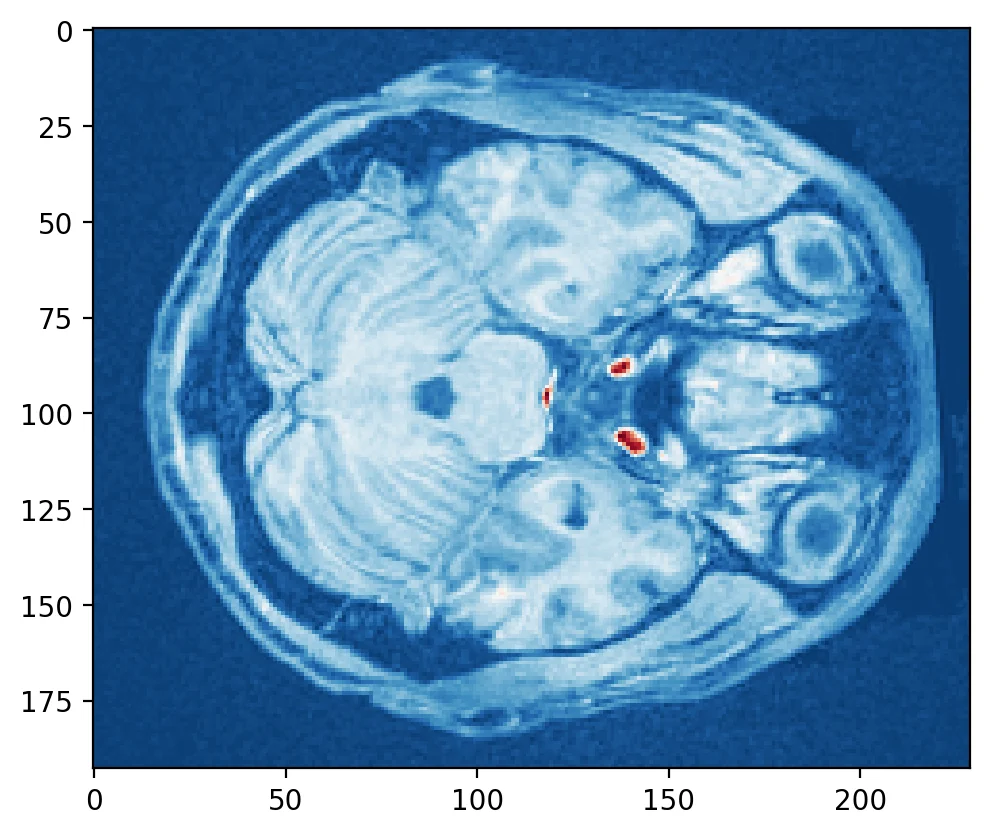
Try slicing different dimensions (x,y,z) yourself to get a feel for how the data is represented in this anatomical image.
We can also access data from the image header. Let's assign the header of an image to a variable and print it to view it's contents.
<class 'nibabel.nifti1.Nifti1Header'> object, endian='<'
sizeof_hdr      : 348
data_type       : b''
db_name         : b''
extents         : 0
session_error   : 0
regular         : b'r'
dim_info        : 0
dim             : [  3 193 229 193   1   1   1   1]
intent_p1       : 0.0
intent_p2       : 0.0
intent_p3       : 0.0
intent_code     : none
datatype        : float32
bitpix          : 32
slice_start     : 0
pixdim          : [1. 1. 1. 1. 0. 0. 0. 0.]
vox_offset      : 0.0
scl_slope       : nan
scl_inter       : nan
slice_end       : 0
slice_code      : unknown
xyzt_units      : 2
cal_max         : 0.0
cal_min         : 0.0
slice_duration  : 0.0
toffset         : 0.0
glmax           : 0
glmin           : 0
descrip         : b'xform matrices modified by FixHeaderApplyTransforms (niworkflows v1.1.12).'
aux_file        : b''
qform_code      : mni
sform_code      : mni
quatern_b       : 0.0
quatern_c       : 0.0
quatern_d       : 0.0
qoffset_x       : -96.0
qoffset_y       : -132.0
qoffset_z       : -78.0
srow_x          : [  1.   0.   0. -96.]
srow_y          : [   0.    1.    0. -132.]
srow_z          : [  0.   0.   1. -78.]
intent_name     : b''
magic           : b'n+1'
Some of the important information in the header is information about the orientation of the image in space. This can be represented as the affine matrix, which can be used to transform images between different spaces.
array([[   1.,    0.,    0.,  -96.],
       [   0.,    1.,    0., -132.],
       [   0.,    0.,    1.,  -78.],
       [   0.,    0.,    0.,    1.]])
We will dive deeper into affine transformations in the preprocessing tutorial.
Plotting Data with Nilearn
There are many useful tools from the nilearn library to help manipulate and visualize neuroimaging data. See their documentation for an example.
In this section, we will explore a few of their different plotting functions, which can work directly with nibabel instances.
A note on displaying plots in marimo
Marimo renders the last expression of each cell. Unlike Jupyter, it
doesn't automatically call _repr_html_ on opaque return objects, so
plot_anat(data) or plt.imshow(...) alone will just print the object's
repr string (e.g. <OrthoSlicer object at 0x...>) instead of a figure.
No %matplotlib inline equivalent is needed — marimo always renders real
Figure objects inline. You just have to make sure the last line of the
cell is a Figure (or an HTML component). Three patterns, in order of
recommendation:
1. Create the figure, pass it in, return it (preferred)
- Explicit figure handle — safe across reactive re-runs
- You control size, DPI, subplot layout
- A couple extra lines per cell
2. Call the plotting function, then plt.gcf() (quick fix)
- One-line escape hatch — easy to retrofit
- gcf() returns whichever figure pyplot touched most recently, which can be surprising when cells re-execute out of order in a reactive notebook
- No control over figure dimensions
3. mo.Html(view.get_iframe()) for nilearn interactive views
Used for view_img, view_connectome, view_surf — these return a nilearn HTMLDocument with embedded JavaScript. The get_iframe() call sandboxes the viewer into its own iframe so its JS doesn't collide with marimo's. Use .html instead of .get_iframe() if you want it inline in the main DOM and are sure there are no JS conflicts.
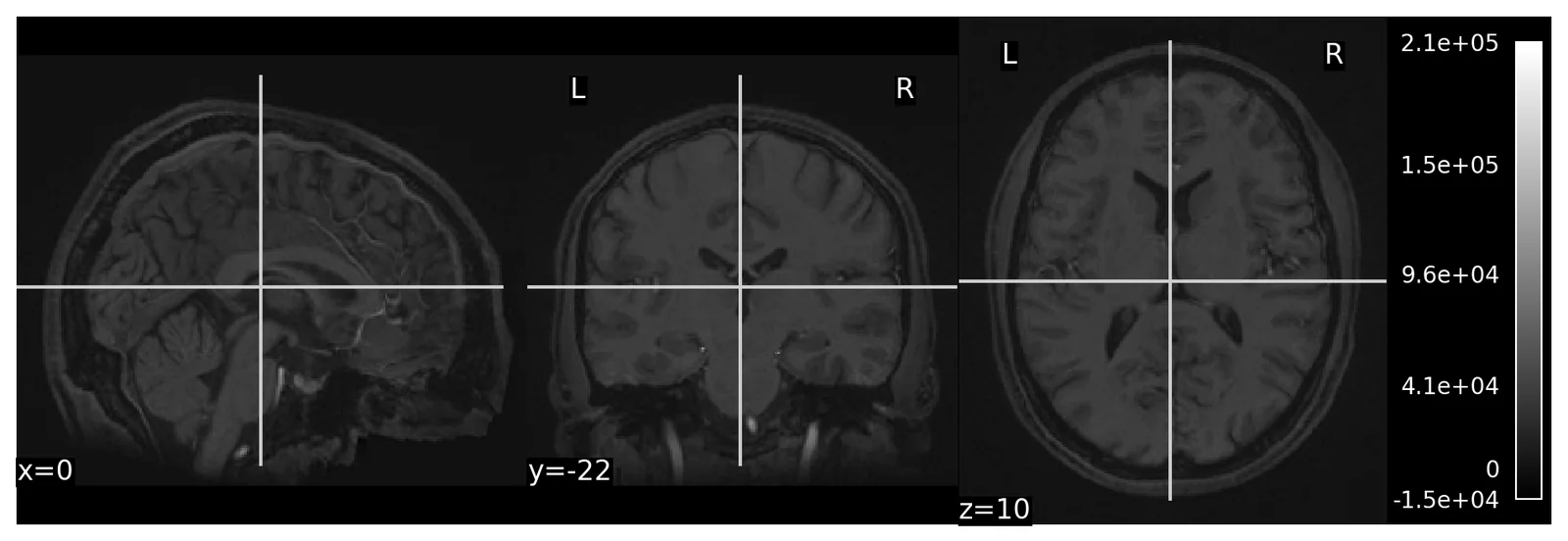
Nilearn plotting functions are very flexible and allow us to easily customize our plots
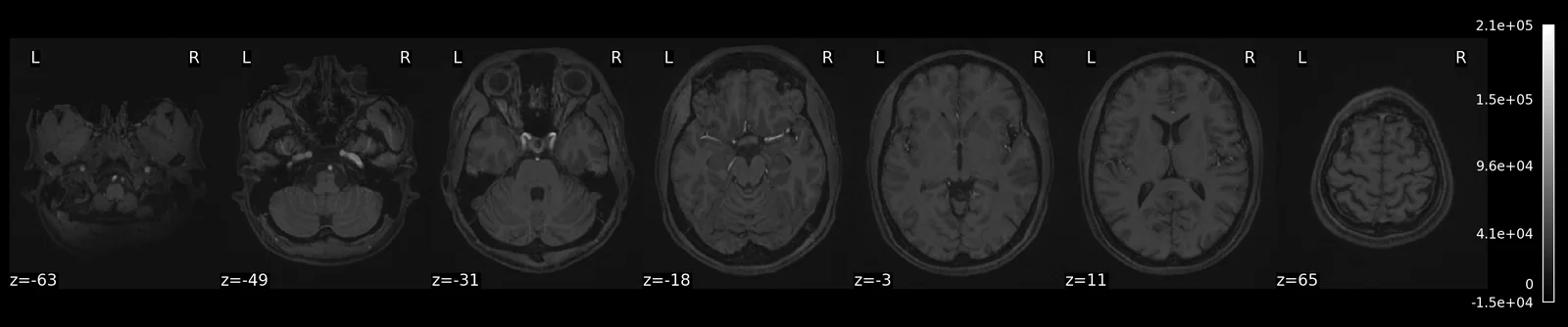
try to get more information how to use the function with ? and try to add different commands to change the plot.
For examining an image interactively, nltools ships a WebGL viewer built on niivue: wrap the image in a BrainData and call .iplot(). Scroll to move through slices, right-drag to change the window, and drag the sliders to threshold.
.iplot() is particularly useful for overlaying a map on an anatomical image so that we can interactively examine where the results are located. By default the background is the MNI152 template that BrainData resamples everything into; pass another image as bg_img to use, say, a participant's own anatomy.
As an example, let's load a mask of the amygdala and try to find where it is located.
We will grab it with nltools.templates.fetch_resource, which pulls files from
nltools' curated collection of masks, atlases, and templates and caches them
locally on first use. It returns a path, which means the result drops straight
into anything that reads a NIfTI file — nilearn's plotting functions,
nibabel.load, or BrainData. Use this in preference to hard-coding a download
URL: links rot, and servers go down at inconvenient moments.
amygdala_mask = fetch_resource('masks/fsl_bilateral_amygdala_thr0.nii.gz')

BrainData(amygdala_mask).iplot()
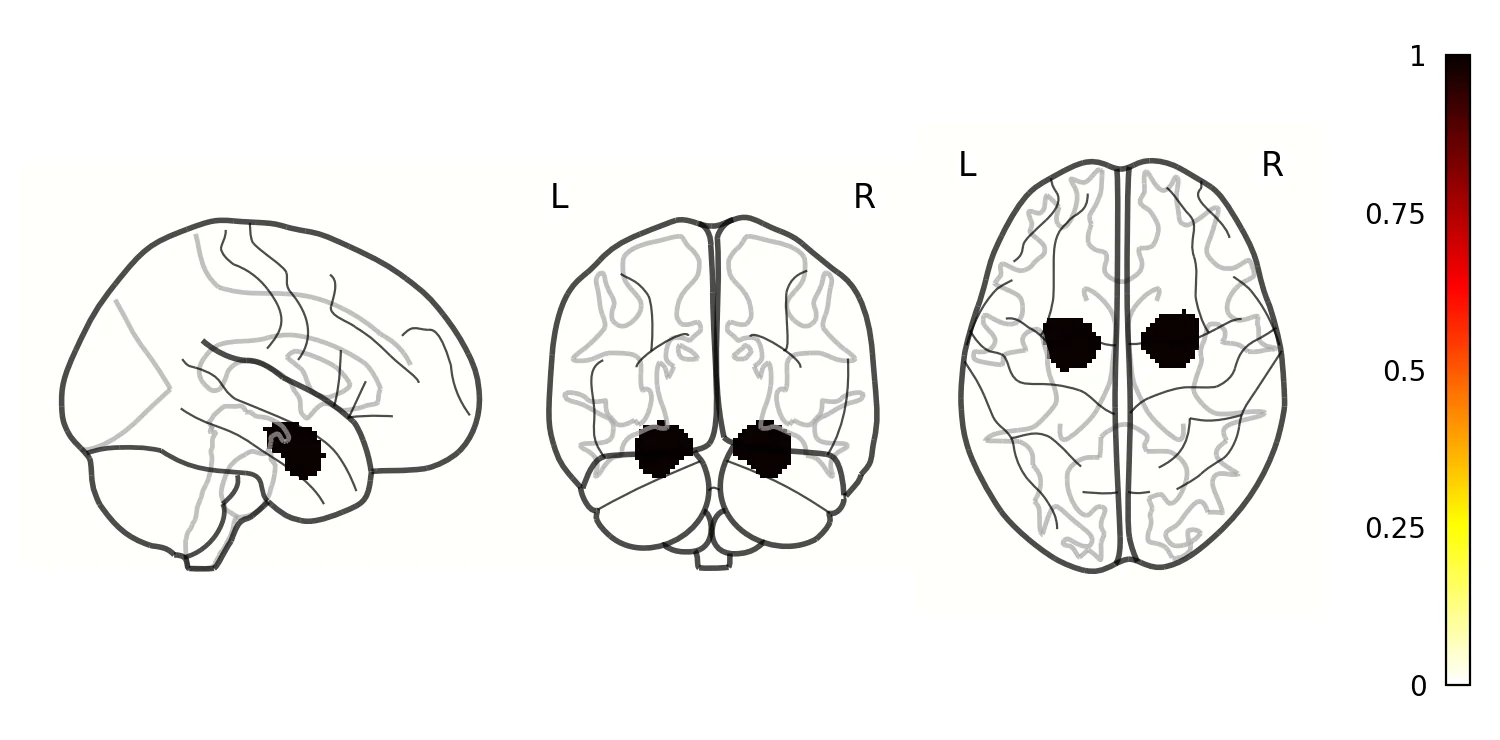
We can also plot a glass brain which allows us to see through the brain from different slice orientations. In this example, we will plot the binary amygdala mask.
Manipulating Data with Nltools
Ok, we've now learned how to use nibabel to load imaging data and nilearn to plot it.
Next we are going to learn how to use the nltools package that tries to make loading, plotting, and manipulating data easier. It uses many functions from nibabel, nilearn, and other python libraries. The bulk of the nltools toolbox is built around the BrainData() class. The concept behind the class is to have a similar feel to a pandas dataframe, which means that it should feel intuitive to manipulate the data.
The BrainData() class has several attributes that may be helpful to know about. First, it stores imaging data in .data as a vectorized observations by features matrix. Each image is an observation and each voxel is a feature. Space is flattened using the brain mask stored in .mask, which is a nibabel image. To go back and forth between this flat 2D representation and a 3D/4D image, use .to_nifti(), or nilearn's apply_mask(img, bd.mask) / unmask(vec, bd.mask) directly. Finally, there are attributes to store either class labels for prediction/classification analyses in .Y and design matrices in .X.
If you don't pass a mask=, BrainData picks a built-in MNI template matching your data's voxel resolution and resamples if needed — so most of the time you never have to think about masks at all.
We will give a quick overview of basic BrainData operations, but we encourage you to see our documentation for more details.
BrainData basics
To get a feel for BrainData, let's load an example anatomical image. We'll use the standard MNI152 template that ships with nilearn.
nltools.data.braindata.BrainData(data=(238955,), resolution=2.0mm, space=mni, mask=2mm-MNI152-2009fsl-mask.nii.gz)
To view the attributes of BrainData use the vars() function.
{'_h5_compression': 'gzip', 'verbose': False, '_resample': True, '_interpolation': 'auto', 'masker': None, '_labels': None, 'model': None, '_mask_was_none': True, 'mask': <nibabel.nifti1.Nifti1Image object at 0x7fd3009a1270>, '_voxel_resolution': array([2., 2., 2.]), '_space': 'mni', 'data': array([2.6666668e-01, 2.8627452e-01, 6.5129025e-17, ..., 6.6274512e-01,
       6.8627453e-01, 6.3529414e-01], shape=(238955,), dtype=float32), '_X': shape: (0, 0)
┌┐
╞╡
└┘, '_Y': shape: (0, 0)
┌┐
╞╡
└┘}
BrainData has many methods to help manipulate, plot, and analyze imaging data. We can use the dir() function to get a quick list of all of the available methods that can be used on this class.
To learn more about how to use these tools either use the ? function, or look up the function in the api documentation.
['X', 'Y', '_X', '_Y', '__add__', '__annotations__', '__class__', '__copy__', '__deepcopy__', '__delattr__', '__dict__', '__dir__', '__doc__', '__eq__', '__firstlineno__', '__format__', '__ge__', '__getattribute__', '__getitem__', '__getstate__', '__gt__', '__hash__', '__iadd__', '__imul__', '__init__', '__init_subclass__', '__isub__', '__iter__', '__itruediv__', '__le__', '__len__', '__lt__', '__module__', '__mul__', '__ne__', '__new__', '__radd__', '__reduce__', '__reduce_ex__', '__repr__', '__rmul__', '__rsub__', '__setattr__', '__setitem__', '__sizeof__', '__static_attributes__', '__str__', '__sub__', '__subclasshook__', '__truediv__', '__weakref__', '_h5_compression', '_interpolation', '_labels', '_mask_was_none', '_resample', '_space', '_voxel_resolution', 'align', 'append', 'apply_mask', 'astype', 'bootstrap', 'cluster_report', 'compute_contrasts', 'copy', 'create_empty', 'data', 'decompose', 'detrend', 'distance', 'dtype', 'extract_roi', 'filter', 'find_spikes', 'fit', 'iplot', 'is_empty', 'mask', 'masker', 'mean', 'median', 'model', 'multivariate_similarity', 'plot', 'plot_flatmap', 'plot_surf', 'predict', 'r_to_z', 'regions', 'resample', 'scale', 'shape', 'similarity', 'size', 'smooth', 'standardize', 'std', 'sum', 'temporal_resample', 'threshold', 'to_nifti', 'transform_pairwise', 'ttest', 'upload_neurovault', 'verbose', 'write', 'z_to_r']
Ok, now let's load a single subject's functional data from the localizer dataset. We will load one that has already been preprocessed with fmriprep and is stored in the derivatives folder.
Loading data can be a little bit slow especially if the data need to be resampled to the template, which is set at \(2mm^3\) by default. However, once it's loaded into the workspace it should be relatively fast to work with it.
If you are taking the course, sign in with your Dartmouth account before running this part. The loaded data is then kept in your course storage (and the course keeps a copy your instructor made ahead of time), so the next time you open this chapter, even in a new session, it loads from there instead of downloading and resampling again. Signing in later works too: the cell below reruns and picks up the stored copy. If you are not at Dartmouth, skip the button; everything works the same way.
Sign in with Dartmouth — not available on the static page
# The cached load below depends on this cell, so signing in reruns it
# against course storage. Its cache key is the same for every signed-in
# reader: the button's value carries no token (marimo-grader-client >= 0.2.2).
storage_ready = storage.connect(signin)
with mo.persistent_cache(
    "intro_bold_s01", store=storage.cache_store() if storage_ready else None
):
    data_1 = BrainData(localizer.get_file('S01', 'derivatives', 'bold'))
Here are a few quick basic data operations.
Find number of images in BrainData() instance
128
Find the dimensions of the data (images x voxels)
(128, 238955)
We can use any type of indexing to slice the data such as integers, lists of integers, slices, or boolean vectors.
import numpy as np
print(data_1[5].shape)
print(data_1[[1, 6, 2]].shape)
print(data_1[0:10].shape)
index = np.zeros(len(data_1), dtype=bool)
index[[1, 5, 9, 16, 20, 22]] = True
print(data_1[index].shape)
(238955,)
(3, 238955)
(10, 238955)
(6, 238955)
Simple Arithmetic Operations
Calculate the mean for every voxel over images
nltools.data.braindata.BrainData(data=(238955,), resolution=2.0mm, space=mni, mask=2mm-MNI152-2009fsl-mask.nii.gz)
Calculate the standard deviation for every voxel over images
nltools.data.braindata.BrainData(data=(238955,), resolution=2.0mm, space=mni, mask=2mm-MNI152-2009fsl-mask.nii.gz)
Methods can be chained. Here we get the shape of the mean.
(238955,)
BrainData instances can be added and subtracted
BrainData instances can be manipulated with basic arithmetic operations.
Here we add 10 to every voxel and scale by 2
BrainData instances can be copied
BrainData instances can be easily converted to nibabel instances, which store the data in a 3D/4D matrix. This is useful for interfacing with other python toolboxes such as nilearn
_nii = data_1.to_nifti()
print(f'{type(_nii).__name__} with shape {_nii.shape}')
print('affine (voxel indices -> mm):')
print(_nii.affine)
Nifti1Image with shape (91, 109, 91, 128)
affine (voxel indices -> mm):
[[  -2.    0.    0.   90.]
 [   0.    2.    0. -126.]
 [   0.    0.    2.  -72.]
 [   0.    0.    0.    1.]]
BrainData instances can be concatenated using the append method
Lists of BrainData instances can also be concatenated by recasting as a BrainData object.
<class 'list'>
<class 'nltools.data.braindata.BrainData'>
Any BrainData object can be written out to a nifti file.
Images within a BrainData() instance are iterable. Here we use a list comprehension to calculate the overall mean across all voxels within an image.
- 0: 3632.535888671875
- 1: 3639.06640625
- 2: 3636.05615234375
- 3: 3631.125244140625
- 4: 3627.156982421875
- 5: 3631.098388671875
- 6: 3648.314208984375
- 7: 3657.765625
- 8: 3654.26171875
- 9: 3658.134521484375
- 10: 3652.416015625
- 11: 3647.302490234375
- 12: 3648.4013671875
- 13: 3651.6298828125
- 14: 3648.5498046875
- 15: 3648.7568359375
- 16: 3654.231689453125
- 17: 3655.2265625
- 18: 3650.02197265625
- 19: 3644.67626953125
- 20: 3645.764892578125
- 21: 3645.06689453125
- 22: 3633.77294921875
- 23: 3635.36669921875
- 24: 3634.095947265625
- 25: 3637.771728515625
- 26: 3636.53271484375
- 27: 3643.0576171875
- 28: 3643.0341796875
- 29: 3635.363525390625
- 30: 3644.48681640625
- 31: 3659.7919921875
- 32: 3650.5302734375
- 33: 3642.402099609375
- 34: 3644.5439453125
- 35: 3638.26123046875
- 36: 3638.7900390625
- 37: 3645.698974609375
- 38: 3641.14697265625
- 39: 3632.21875
- 40: 3624.99365234375
- 41: 3628.278564453125
- 42: 3626.063232421875
- 43: 3623.818603515625
- 44: 3636.20556640625
- 45: 3628.587646484375
- 46: 3629.2666015625
- 47: 3622.416015625
- 48: 3617.248291015625
- 49: 3609.93994140625
- 50: 3620.990478515625
- 51: 3626.564208984375
- 52: 3631.967529296875
- 53: 3629.276123046875
- 54: 3631.380126953125
- 55: 3625.39453125
- 56: 3621.508056640625
- 57: 3620.31640625
- 58: 3625.705322265625
- 59: 3626.373046875
- 60: 3623.367919921875
- 61: 3630.57763671875
- 62: 3630.80859375
- 63: 3626.887451171875
- 64: 3622.80908203125
- 65: 3618.686279296875
- 66: 3617.235595703125
- 67: 3615.701416015625
- 68: 3618.189697265625
- 69: 3622.93115234375
- 70: 3618.40625
- 71: 3611.33447265625
- 72: 3613.984375
- 73: 3630.378173828125
- 74: 3630.091796875
- 75: 3622.900634765625
- 76: 3613.849853515625
- 77: 3614.9833984375
- 78: 3622.984130859375
- 79: 3622.44873046875
- 80: 3619.928466796875
- 81: 3612.1162109375
- 82: 3614.84228515625
- 83: 3608.731201171875
- 84: 3614.76708984375
- 85: 3609.982177734375
- 86: 3606.2119140625
- 87: 3602.9208984375
- 88: 3602.13232421875
- 89: 3601.9208984375
- 90: 3611.099853515625
- 91: 3619.507568359375
- 92: 3616.99755859375
- 93: 3613.65185546875
- 94: 3607.451416015625
- 95: 3624.701904296875
- 96: 3628.37451171875
- 97: 3612.5478515625
- 98: 3596.0322265625
- 99: 3581.294189453125
- 100: 3580.8046875
- 101: 3584.3642578125
- 102: 3593.828125
- 103: 3605.689208984375
- 104: 3608.283935546875
- 105: 3622.22314453125
- 106: 3618.567626953125
- 107: 3613.90087890625
- 108: 3607.047119140625
- 109: 3598.382080078125
- 110: 3589.81005859375
- 111: 3588.80224609375
- 112: 3599.53369140625
- 113: 3603.514404296875
- 114: 3602.968017578125
- 115: 3611.65966796875
- 116: 3611.822021484375
- 117: 3605.568603515625
- 118: 3593.0810546875
- 119: 3592.416259765625
- 120: 3600.1591796875
- 121: 3612.861572265625
- 122: 3611.458740234375
- 123: 3619.375244140625
- 124: 3613.787353515625
- 125: 3599.899658203125
- 126: 3595.6259765625
- 127: 3597.057373046875
Though, we could also do this with the mean method by setting axis=1.
array([3632.53  , 3639.0793, 3636.0715, 3631.1707, 3627.165 , 3631.1414,
       3648.364 , 3657.8232, 3654.2737, 3658.1902, 3652.4333, 3647.3633,
       3648.4082, 3651.618 , 3648.579 , 3648.783 , 3654.2578, 3655.2383,
       3650.0476, 3644.7017, 3645.769 , 3645.0923, 3633.8008, 3635.4055,
       3634.1016, 3637.7654, 3636.5955, 3643.055 , 3643.0908, 3635.3357,
       3644.4727, 3659.8186, 3650.572 , 3642.483 , 3644.573 , 3638.2964,
       3638.8037, 3645.79  , 3641.1892, 3632.203 , 3624.985 , 3628.261 ,
       3626.0886, 3623.8179, 3636.2058, 3628.6697, 3629.2744, 3622.452 ,
       3617.3035, 3609.9436, 3620.984 , 3626.5994, 3631.9756, 3629.313 ,
       3631.45  , 3625.457 , 3621.5295, 3620.3171, 3625.7253, 3626.4167,
       3623.3667, 3630.6416, 3630.8215, 3626.9053, 3622.8467, 3618.6643,
       3617.23  , 3615.7666, 3618.203 , 3622.9683, 3618.4648, 3611.3499,
       3614.023 , 3630.3699, 3630.137 , 3622.9497, 3613.8357, 3615.0117,
       3622.964 , 3622.486 , 3619.9705, 3612.143 , 3614.8345, 3608.7517,
       3614.8237, 3609.9866, 3606.2466, 3602.9536, 3602.1902, 3601.9006,
       3611.1196, 3619.502 , 3616.9788, 3613.6602, 3607.432 , 3624.7732,
       3628.4172, 3612.5823, 3596.0686, 3581.3474, 3580.8118, 3584.3967,
       3593.8608, 3605.717 , 3608.2812, 3622.281 , 3618.5564, 3613.9634,
       3607.0625, 3598.441 , 3589.852 , 3588.7988, 3599.5898, 3603.5522,
       3603.013 , 3611.683 , 3611.8572, 3605.5708, 3593.1145, 3592.3994,
       3600.1968, 3612.866 , 3611.4539, 3619.432 , 3613.8289, 3599.8928,
       3595.616 , 3597.0923], dtype=float32)
Let's plot the mean to see how the global signal changes over time.
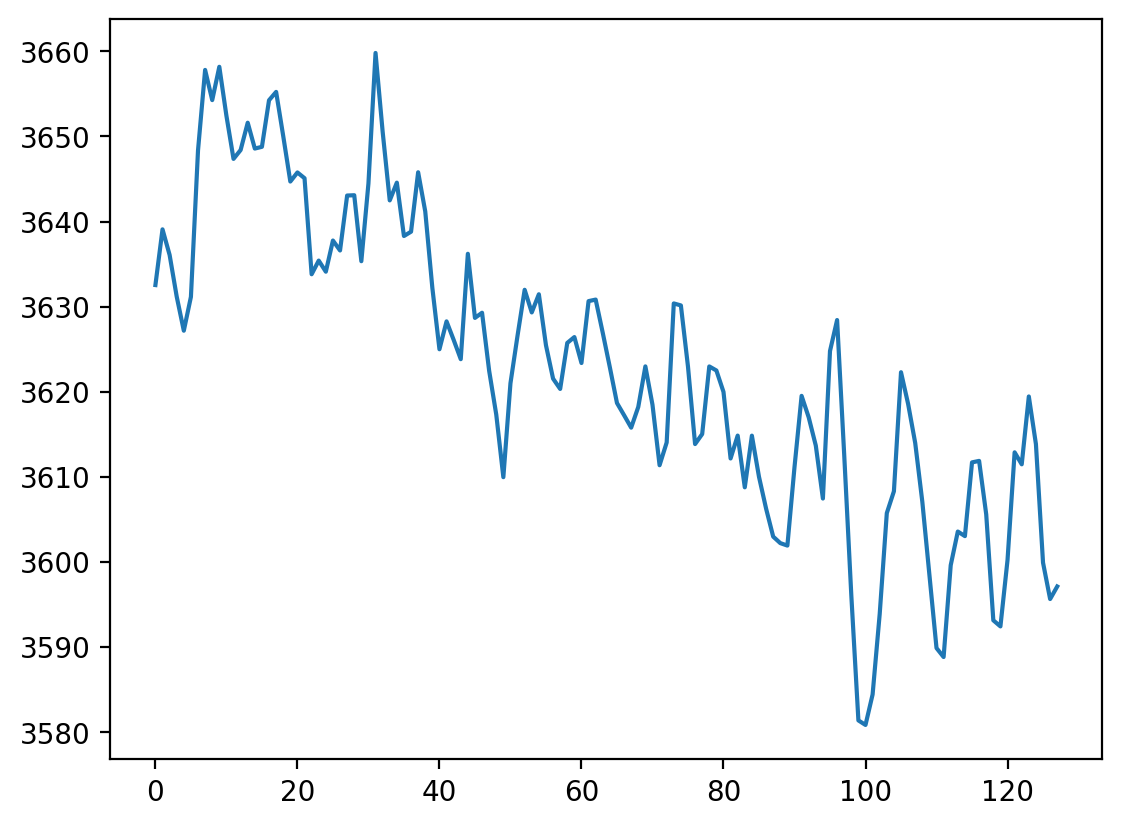
Notice the slow linear drift over time, where the global signal intensity gradually decreases. We will learn how to remove this with a high pass filter in future tutorials.
Plotting
There are multiple ways to plot your data.
For a very quick plot, you can return a montage of axial slices with the .plot() method. As an example, we will plot the mean of each voxel over time.
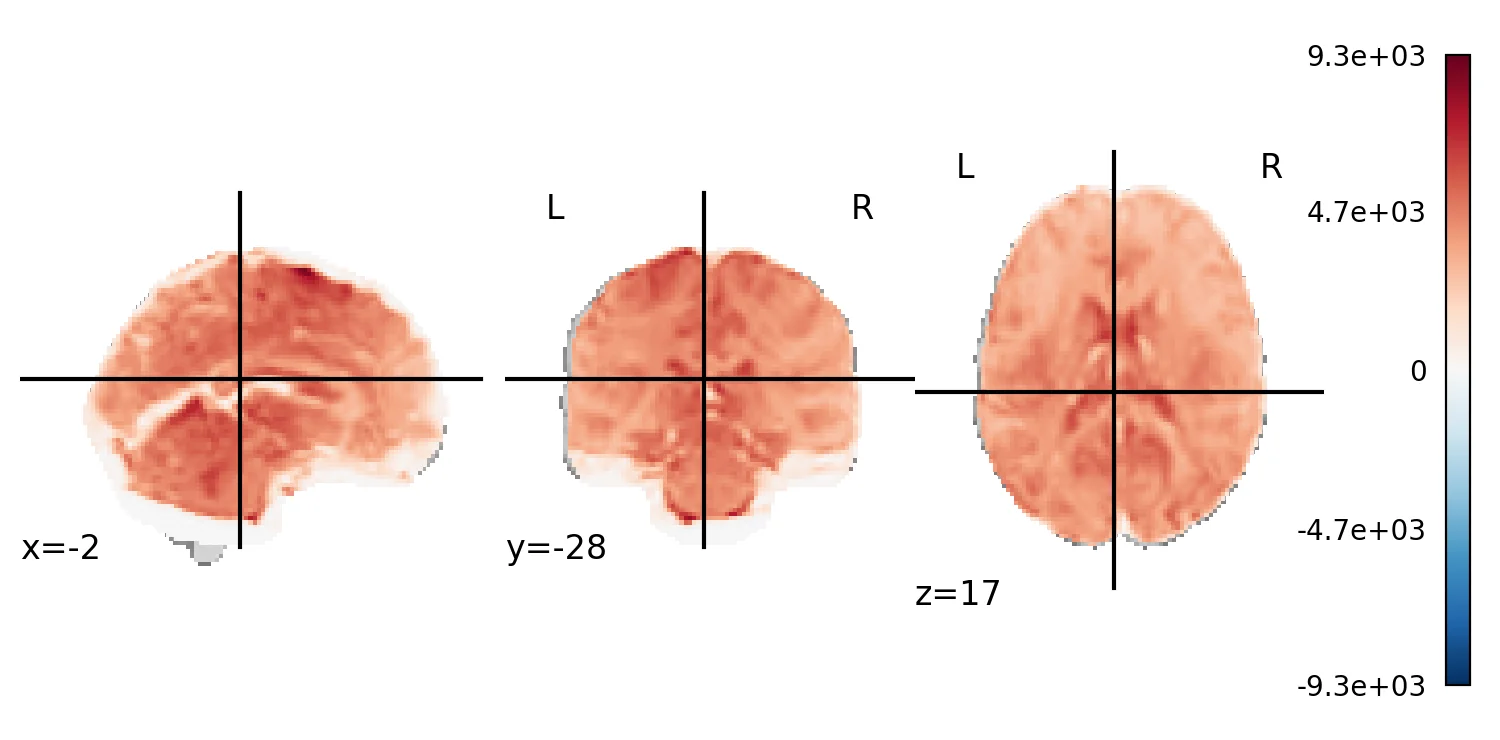
.iplot() works on any BrainData, not just the mask we viewed above. On 4D data the viewer also scrubs through volumes; here we look at the mean image.
BrainData() instances can be converted to a nibabel instance and plotted using any nilearn plot method such as glass brain.
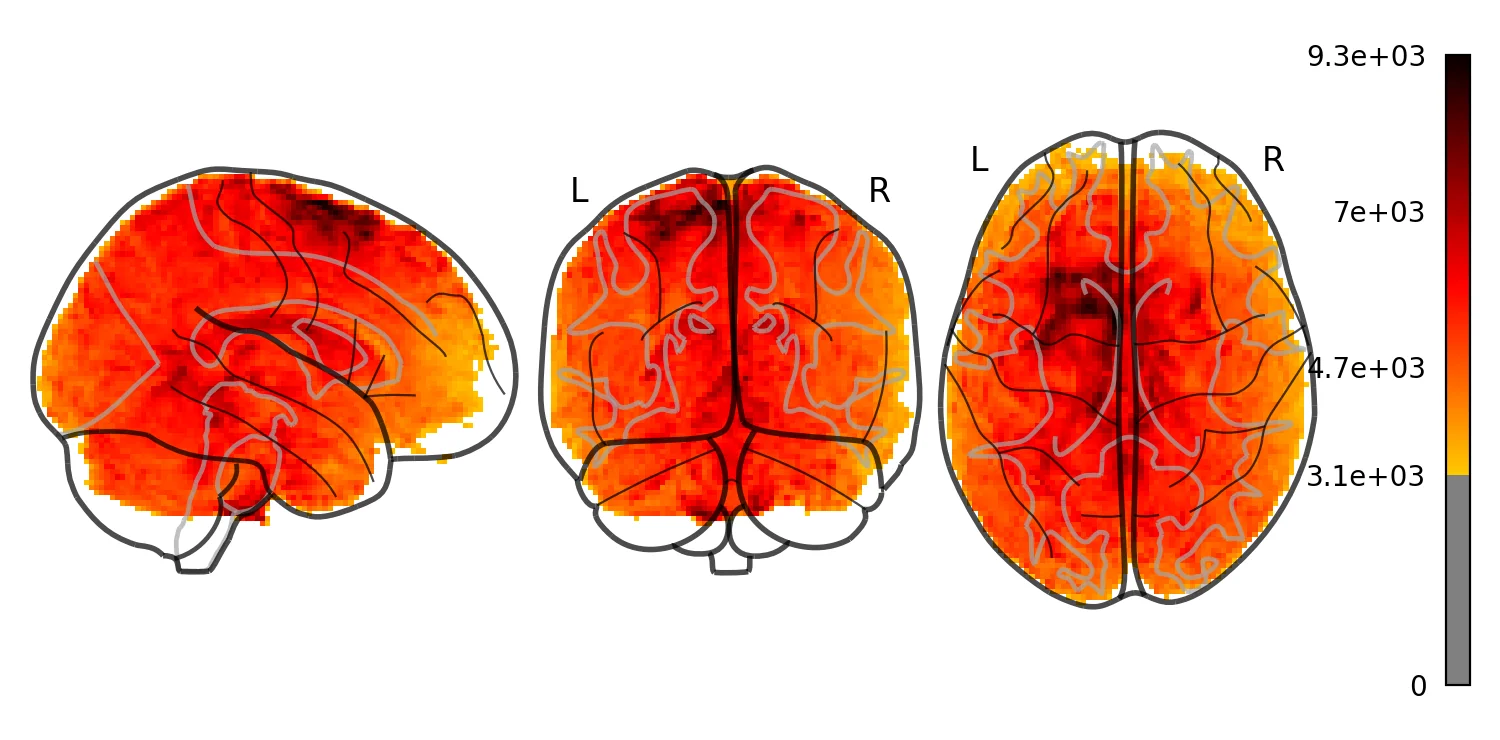
Ok, that's the basics. BrainData can do much more!
Check out some of our tutorials for more detailed examples.
We'll be using this tool throughout the course.
Exercises
For homework, let's practice our skills in working with data.
Exercise 1
A few subjects have already been preprocessed with fMRI prep.
Use localizer.get_subjects() to figure out which subjects are available in the dataset.
Exercise 2
One question we are often interested in is where in the brain do we have an adequate signal to noise ratio (SNR). There are many different metrics, here we will use temporal SNR, which the voxel mean over time divided by it's standard deviation.
In Exercise 2, calculate the SNR for S01 and plot this so we can figure which regions have high and low SNR.
Exercise 3
We are often interested in identifying outliers in our data. In this exercise, find any image that is outside 95% of all images based on global intensity (i.e., zscore greater than 2) from 'S01' and plot each one.
Assignment: Introduction to Neuroimaging Data
- Setup
- Q1. Load a run
- Q2. Where can you actually measure anything?
- Q3. Volumes that do not belong
- Q4. The same question asked of head motion
- Q5. Do the two measures agree?