Thresholding Group Analyses
Written by Luke Chang
Now that we have learned how to estimate a single-subject model, create contrasts, and run a group-level analysis, the next important topic to cover is how we can threshold these group maps. This is not as straightforward as it might seem as we need to be able to correct for multiple comparisons.
In this tutorial, we will cover how we go from modeling brain responses in each voxel for a single participant to making inferences about the group. We will cover the following topics:
- Issues with correcting for multiple comparisons
- Family Wise Error Rate
- Bonferroni Correction
- False Discovery Rate
- Permutation tests and the resolution of a p-value
- Max-statistic correction
- Cluster inference, and why it needs spatial smoothness
- Running corrections on real data, and reporting what survives
Let's get started by watching an overview of multiple comparisons by Martin Lindquist.
||(H_0||) is true, but we mistakenly reject it (i.e., False Positive)- This is controlled by significance level
||(\alpha||) .
||(H_0||) is false, but we fail to reject it (False Negative)
Simulations
Let's explore the concept of false positives to get an intuition about what the overall goals and issues are in controlling for multiple tests.
Let's load the modules we need for this tutorial. We will be using the SimulateGrid class which contains everything we need to run all of the simulations.
# '%matplotlib inline' command supported automatically in marimo

import os
import glob
import contextlib
import io
import numpy as np
import pandas as pd
import matplotlib.pyplot as plt
import seaborn as sns
import plotly.graph_objects as go
from scipy.ndimage import label, gaussian_filter
from scipy.stats import ttest_1samp
from nilearn.glm.second_level import non_parametric_inference
from nilearn.plotting import plot_stat_map
from nltools.data import BrainData
from nltools import SimulateGrid
from nltools.algorithms import fdr, threshold
from nltools.templates import fetch_resource
from nltools.algorithms.inference import one_sample_permutation_test
from dartbrains_tools.data import localizer
Okay, let's get started and generate 100 x 100 voxels from \(\mathcal{N}(0,1)\) distribution for 20 independent participants.
simulation = SimulateGrid(grid_width=100, n_subjects=20)
_f, _a = plt.subplots(nrows=5, ncols=4, figsize=(15, 15), sharex=True, sharey=True)
counter = 0
for col in range(4):
    for row in range(5):
        sns.heatmap(simulation.data[:, :, counter], ax=_a[row, col], cmap='RdBu_r', vmin=-4, vmax=4)
        _a[row, col].set_title(f'Subject {counter + 1}', fontsize=16)
        counter = counter + 1
plt.tight_layout()
plt.gcf()
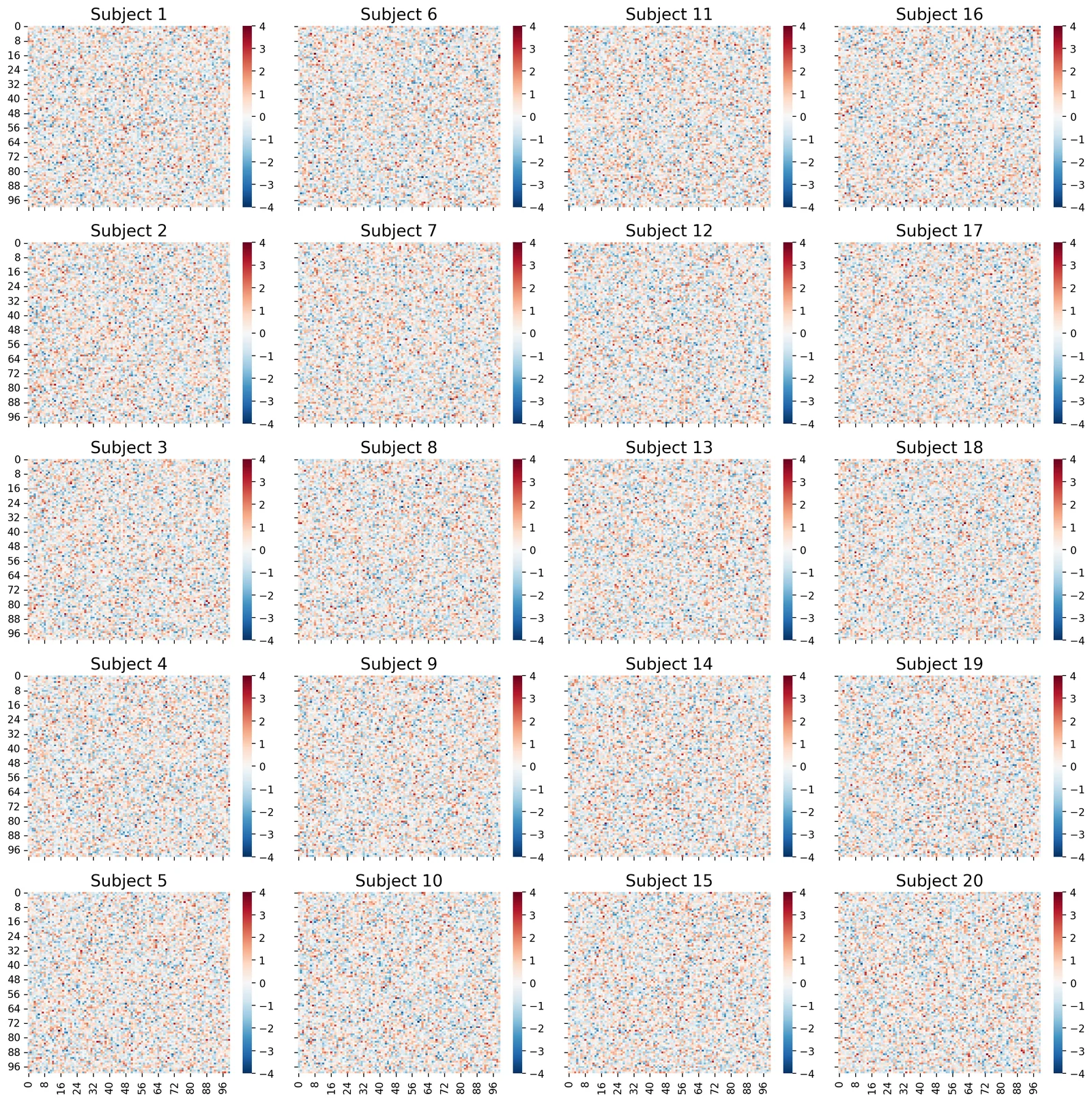
Each subject's simulated data is on a 100 x 100 grid. Think of this as a slice from their brain, where each pixel corresponds to the same spatial location across all participants. We have generated random noise separately for each subject. We have not added any true signal in this simulation yet.
This figure is simply to highlight that we are working with 20 independent subjects. In the rest of the plots, we will be working with a single grid that aggregates the results across participants.
Now we are going to start running some simulations to get a sense of the number of false positives we might expect to observe with this data. We will now run an independent one-sample t-test on every pixel in the grid across all 20 participants.
simulation.fit()

sns.heatmap(simulation.t_values, square=True, cmap='RdBu_r', vmin=-4, vmax=4)
plt.title("T Values", fontsize=18)
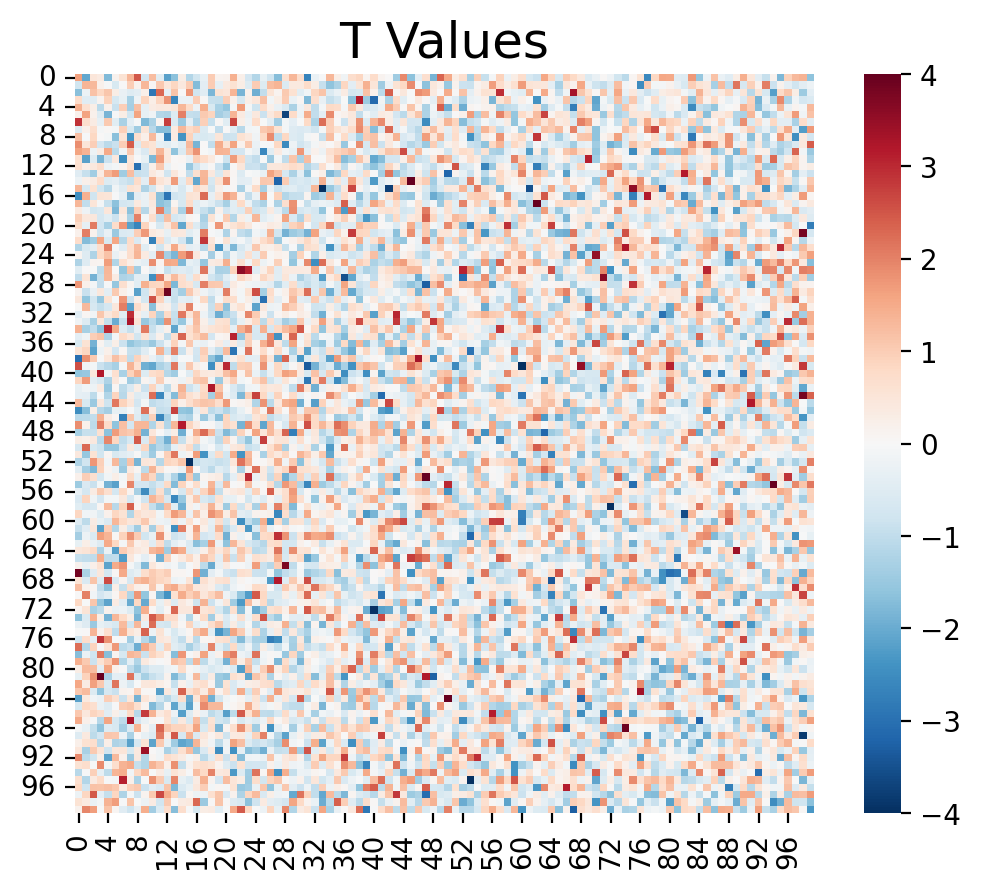
Even though there was no signal in this simulation, you can see that there are a number of pixels in the grid that exceed a t-value above 2 and below -2, which is the approximate cutoff for p < 0.05. These are all false positives.
Now let's apply a threshold. We can specify thresholds at a specific t-value using the threshold_type='t'. Alternatively, we can specify a specific p-value using the threshold_type='p'. To calculate the number of false positives, we can simply count the number of tests that exceed this threshold.
If we run this simulation again 100 times, we can estimate the false positive rate, which is the average number of false positives over all 100 simulations.
Let's see what this looks like for a threshold of p < 0.05.
_threshold = 0.05
simulation_1 = SimulateGrid(grid_width=100, n_subjects=20)
simulation_1.plot_grid_simulation(threshold=_threshold, threshold_type='p', n_simulations=100)
plt.gcf()
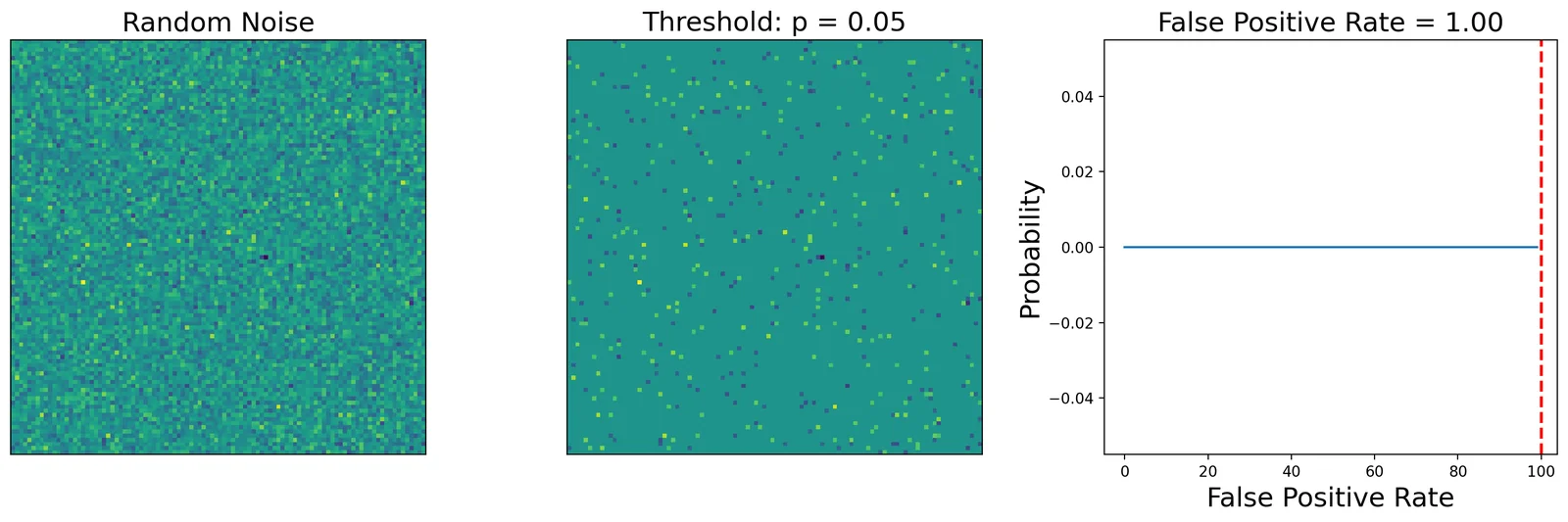
The left panel is the average over all of the participants. The middle panel show voxels that exceed the statistical threshold. The right panel is the overall false-positive rate across the 100 simulations.
In this simulation, a threshold of p < 0.05 results in observing at least one voxels that is a false positive across every one of our 100 simulations.
What if we looked at a fewer number of voxels? How would this change our false positive rate?
_threshold = 0.05
simulation_2 = SimulateGrid(grid_width=5, n_subjects=20)
simulation_2.plot_grid_simulation(threshold=_threshold, threshold_type='p', n_simulations=100)
plt.gcf()
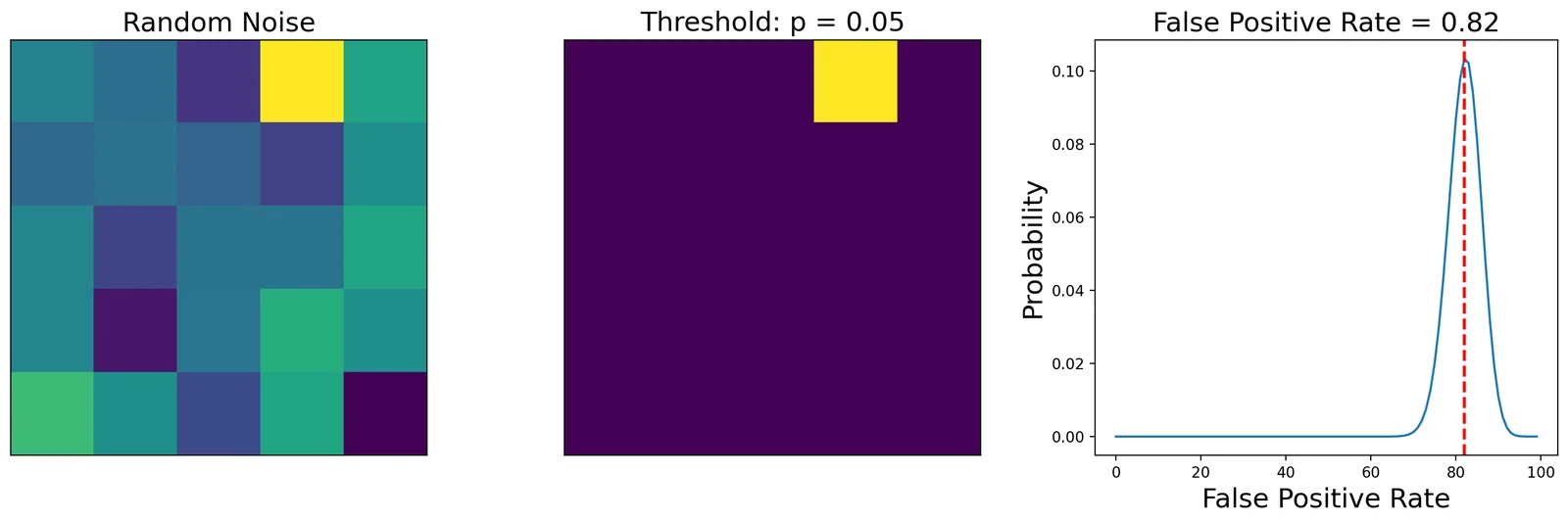
This simulation shows that examining fewer numbers of voxels will yield considerably less false positives. One common approach to controlling for multiple tests involves only looking for voxels within a specific region of interest (e.g., small volume correction), or looking at average activation within a larger region (e.g., ROI based analyses).
What about if we increase the threshold on our original 100 x 100 grid?
_threshold = 0.0001
simulation_3 = SimulateGrid(grid_width=100, n_subjects=20)
simulation_3.plot_grid_simulation(threshold=_threshold, threshold_type='p', n_simulations=100)
plt.gcf()
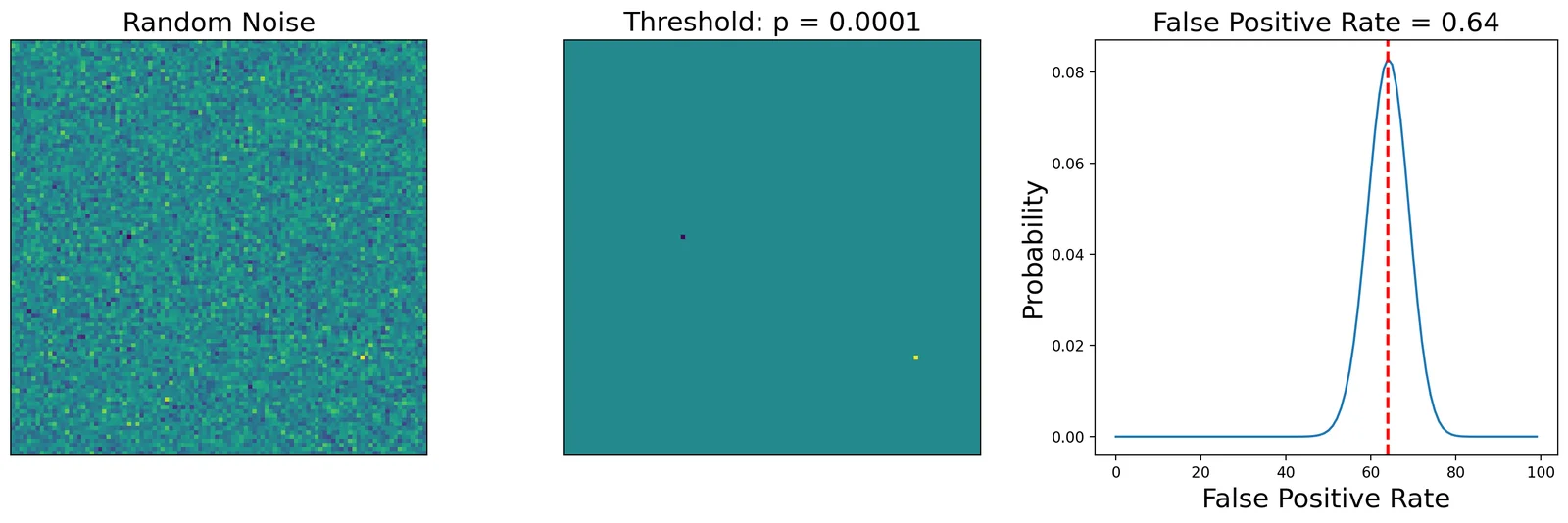
You can see that this dramatically decreases the number of false positives to the point that some of the simulations no longer contain any false positives.
How bad is uncorrected really?
Before we start correcting, it is worth pinning down the size of the problem with a number rather than an impression. Suppose we test every voxel at p < 0.001 — a threshold that sounds strict, and which you will see reported in plenty of papers as though it were a correction.
If the voxels were independent, the probability that a map made of pure noise contains at least one false positive is
for \(M\) voxels. Let's check that against a simulation on a smaller 30 x 30 grid, where \(M = 900\).
# 100 simulated experiments containing nothing but noise. Every voxel that
# survives a threshold here is a false positive by construction.
_rng = np.random.default_rng(0)
_width, _n_subjects, _n_sims = 30, 20, 100
_n_voxels = _width * _width

_any_false_positive = 0
for _i in range(_n_sims):
    _noise = _rng.standard_normal((_n_subjects, _n_voxels))
    _tvals, _pvals = ttest_1samp(_noise, 0, axis=0)
    _any_false_positive += (_pvals < 0.001).any()

empirical_any_fp = _any_false_positive / _n_sims
theoretical_any_fp = 1 - (1 - 0.001) ** _n_voxels

print(f"Maps with >= 1 false positive at p < .001: {empirical_any_fp:.0%}")
print(f"Theory, 1 - (1 - .001)^{_n_voxels}:            {theoretical_any_fp:.1%}")
Maps with >= 1 false positive at p < .001: 56%
Theory, 1 - (1 - .001)^900:            59.4%
Roughly half of all completely null experiments would report at least one "significant" voxel at p < 0.001, and the simulation lands close to the analytic prediction. And this is on a 900-voxel grid — a real brain has a couple of hundred thousand voxels, where the probability is essentially 1.
This is the entire motivation for everything that follows. An uncorrected threshold does not control anything at the level of the map; it only controls the error rate of a single voxel considered in isolation, which is not the question anyone is actually asking.
What is the optimal threshold that will give us an \(\alpha=0.05\)?
To calculate this, we will run 100 simulations at different threshold levels to find the threshold that leads to a false positive rate that is lower than our alpha value.
We could search over t-values, or p-values. Let's explore t-values first.
A few steps in this chapter run thousands of simulated or permuted tests and take minutes: the false-positive sweep below and the TFCE permutation test later on. If you are taking the course, sign in with your Dartmouth account before running them: the results are then kept in your course storage, and the course keeps a copy your instructor computed ahead of time, so they load in seconds instead. Signing in later works too: the slow cells rerun and pick up the stored copy. If you are not at Dartmouth, skip the button; everything works the same way.
Sign in with Dartmouth — not available on the static page
# The slow cells below depend on this one, so signing in reruns them against
# course storage. Their cache keys are the same for every signed-in reader:
# the button's value carries no token (marimo-grader-client >= 0.2.2).
storage_ready = storage.connect(signin)
# 20 thresholds × 100 simulations × a 100×100 voxel grid is ~20 M
# t-tests via joblib — many minutes cold. mo.persistent_cache writes
# the FPR result to __marimo__/cache/ so the first build pays the
# cost once and every subsequent (re)build is instant. The cache
# invalidates automatically if any input variable in this cell
# changes.
alpha = 0.05
n_simulations = 100
x = np.arange(3, 7, 0.2)
with mo.persistent_cache("threshold_fpr_sweep", store=storage.cache_store() if storage_ready else None):
    sim_all = []
    for p in x:
        sim = SimulateGrid(grid_width=100, n_subjects=20)
        sim.run_multiple_simulations(threshold=p, threshold_type='t', n_simulations=n_simulations)
        sim_all.append(sim.fpr)
_fig = go.Figure()
_fig.add_trace(go.Scatter(
    x=x, y=sim_all, mode='lines+markers',
    name='False Positive Rate', line=dict(width=2),
    hovertemplate='t=%{x:.2f}<br>FPR=%{y:.3f}<extra></extra>',
))
_fig.add_hline(
    y=alpha, line=dict(color='red', dash='dash', width=2),
    annotation_text=f'α = {alpha}', annotation_position='top right',
)
_fig.update_layout(
    xaxis_title='Threshold (t)',
    yaxis_title='False Positive Rate',
    title=f'Simulations = {n_simulations}',
    height=400,
    hovermode='x unified',
    margin=dict(l=60, r=20, t=50, b=50),
)
_fig
As you can see, the false positive rate is close to our alpha starting at a threshold of about 6.2. This means that when we test a hypothesis over 10,000 independent voxels, we can be confident that we will only observe false positives in approximately 5 out of 100 experiments. This means that we are effectively controlling the family wise error rate (FWER).
Let's use that threshold for our simulation again.
simulation_4 = SimulateGrid(grid_width=100, n_subjects=20)
simulation_4.plot_grid_simulation(threshold=6.2, threshold_type='t', n_simulations=100)
plt.gcf()
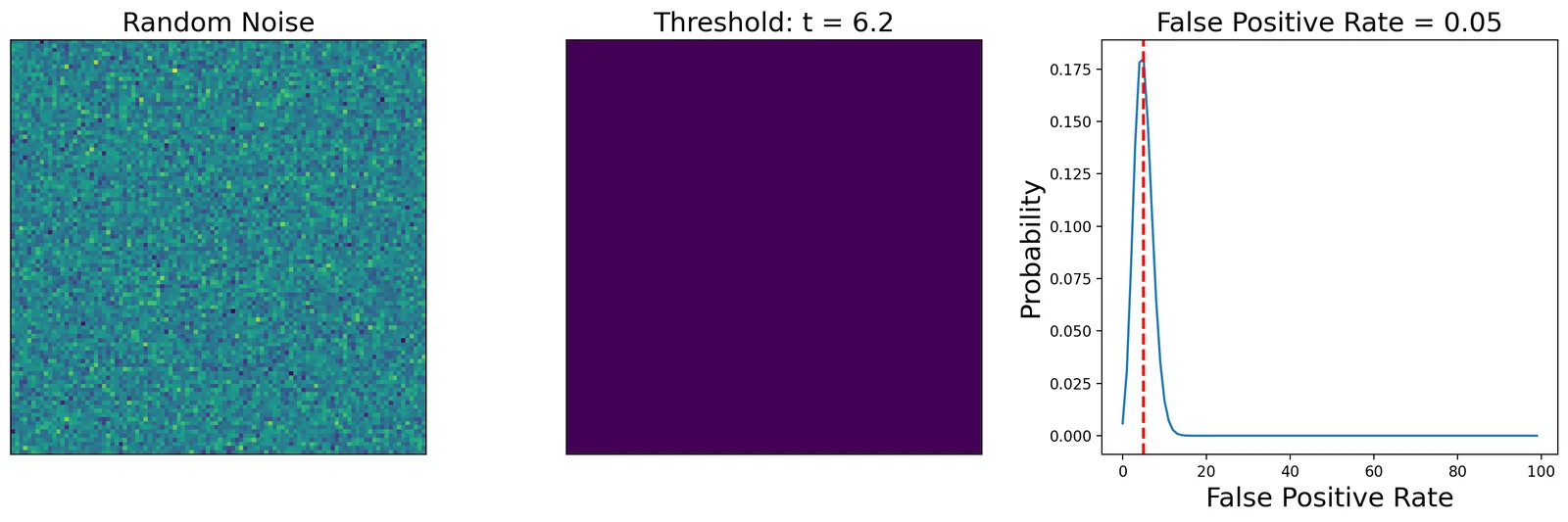
Notice, that we are now observing a false positive rate of approximately .05, though this number will slightly change each time you run the simulation.
Another way to find the threshold that controls FWER is to divide the alpha by the number of independent tests across voxels. This is called the bonferroni correction.
\({bonferroni} = \frac{\alpha}{M}\), where \(M\) is the number of voxels.
_grid_width = 100
_threshold = 0.05 / _grid_width ** 2
simulation_5 = SimulateGrid(grid_width=_grid_width, n_subjects=20)
simulation_5.plot_grid_simulation(threshold=_threshold, threshold_type='p', n_simulations=100)
plt.gcf()
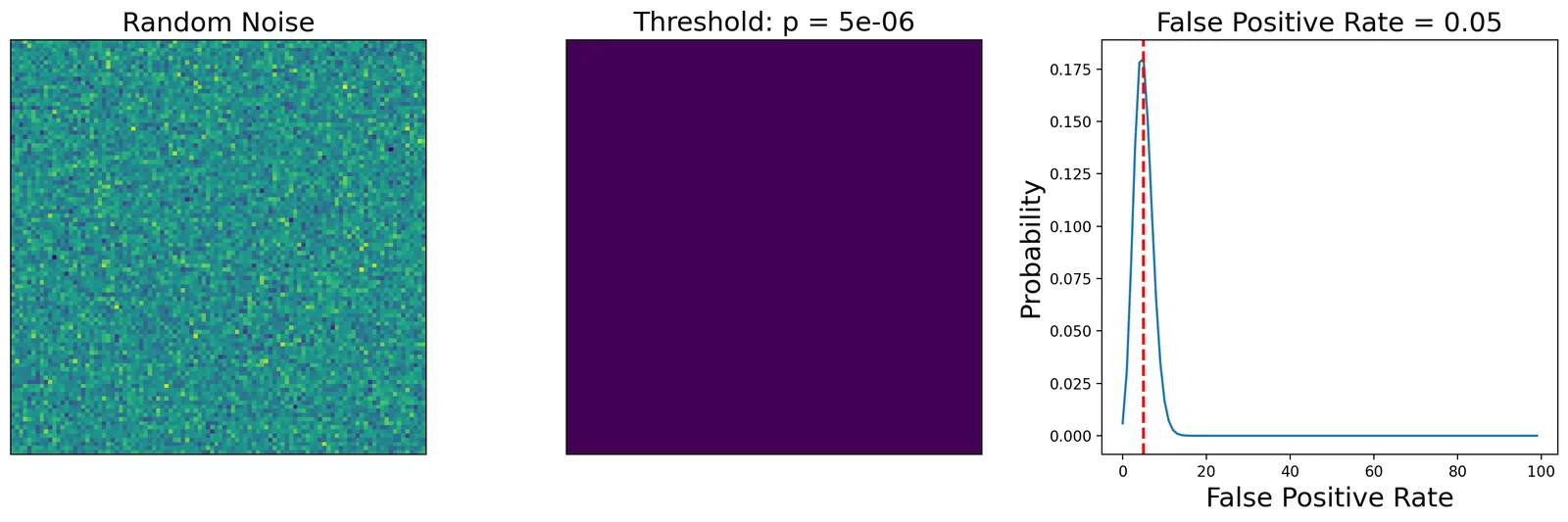
This seems like a great way to ensure that we minimize our false positives.
Now what happens when start adding signal to our simulation?
We will represent signal in a smaller square in the middle of the simulation. The width of the square can be changed using the signal_width parameter. The amplitude of this signal is controlled by the signal_amplitude parameter.
Let's see how well the bonferroni threshold performs when we add 100 voxels of signal.
_grid_width = 100
_threshold = 0.05 / _grid_width ** 2
signal_width = 10
_signal_amplitude = 1
simulation_6 = SimulateGrid(signal_amplitude=_signal_amplitude, signal_width=10, grid_width=_grid_width, n_subjects=20)
simulation_6.plot_grid_simulation(threshold=_threshold, threshold_type='p', n_simulations=100)
plt.gcf()
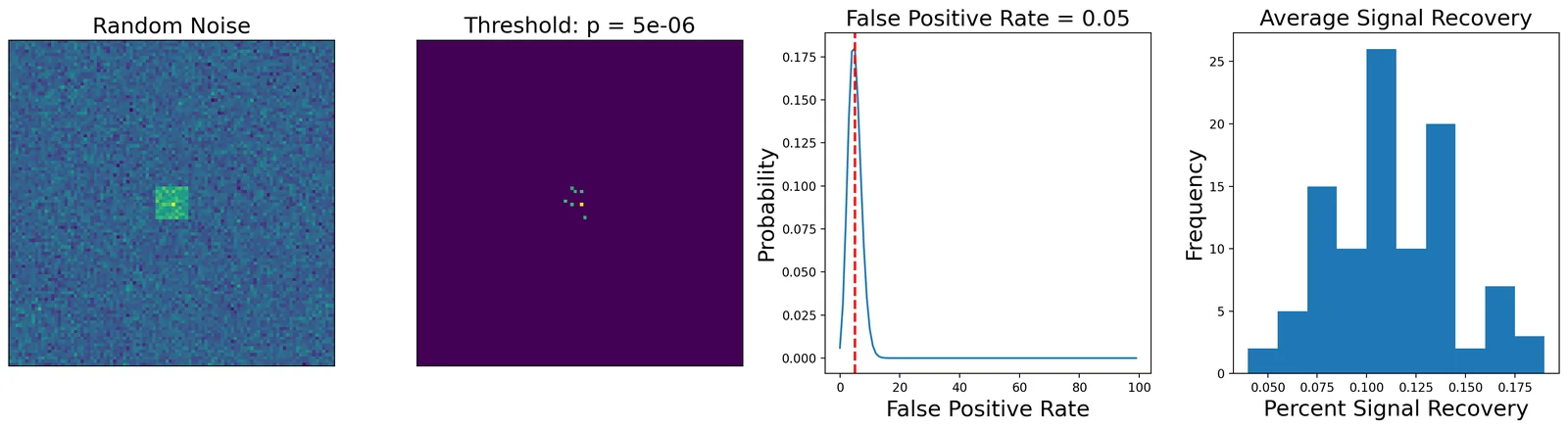
Here we show how many voxels were identified using the bonferroni correction.
In the left panel is the average data across all 20 participants. The second panel, shows the voxels that exceed the statistical threshold. The third panel shows the false positive rate, and the 4th panel furthest on the right shows the average signal recovery (how many voxels survived within the true signal square across all 100 simulations.
We can see that we have an effective false positive rate approximately equal to our alpha threshold. However, our threshold is so high, that we can barely detect any true signal with this amplitude. In fact, we are only recovering about 12% of the voxels that should have signal.
This simulation highlights the main issue with using bonferroni correction in practice. The threshold is so conservative that the magnitude of an effect needs to be unreasonably large to survive correction over hundreds of thousands of voxels.
False Discovery Rate (FDR)
You may be wondering why we need to control for any false positive when testing across hundreds of thousands of voxels. Surely a few are okay as long as they don't overwhelm the true signal.
Let's learn about the False Discovery Rate (FDR) from another video by Martin Lindquist.
1. We select a desired limit $q$ on FDR, which is the proportion of false positives we are okay with observing (e.g., 5/100 tests or 0.05).

2. We rank all of the p-values over all the voxels from the smallest to largest.

3. We find the threshold $r$ such that $p \leq i/m * q$

4. We reject any $H_0$ that is lower than $r$.
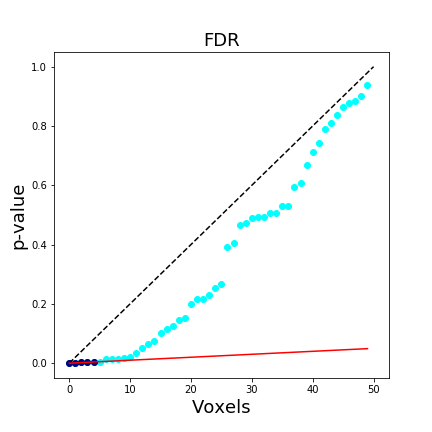 In a brain map, this means that we expect approximately 95% of the voxels reported at q < .05 FDR-corrected to be true activations (note we use q instead of p). The FDR procedure adaptively identifies a threshold based on the overall signal across all voxels. Larger signals results in lower thresholds. Importantly, if all of the null hypotheses are true, then the FDR will be equivalent to the FWER. This means that any FWER procedure will also control the FDR. For these reasons, any procedure which controls the FDR is necessarily less stringent than a FWER controlling procedure, which leads to an overall increased power. Another nice feature of FDR, is that it operates on p-values instead of test statistics, which means it can be applied to most statistical tests.
This figure is taken from Poldrack, Mumford, & Nichols (2011) and compares different procedures to control for multiple tests.
In a brain map, this means that we expect approximately 95% of the voxels reported at q < .05 FDR-corrected to be true activations (note we use q instead of p). The FDR procedure adaptively identifies a threshold based on the overall signal across all voxels. Larger signals results in lower thresholds. Importantly, if all of the null hypotheses are true, then the FDR will be equivalent to the FWER. This means that any FWER procedure will also control the FDR. For these reasons, any procedure which controls the FDR is necessarily less stringent than a FWER controlling procedure, which leads to an overall increased power. Another nice feature of FDR, is that it operates on p-values instead of test statistics, which means it can be applied to most statistical tests.
This figure is taken from Poldrack, Mumford, & Nichols (2011) and compares different procedures to control for multiple tests.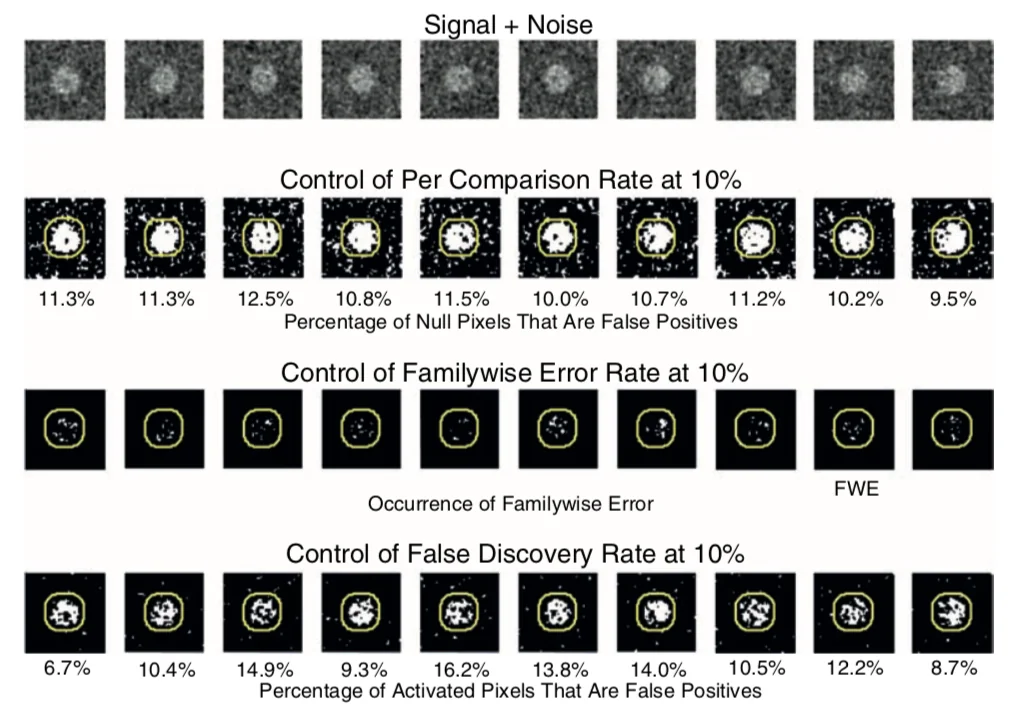 For a more indepth overview of FDR, see this tutorial by Matthew Brett.
Let's now try to apply FDR to our own simulations. All we need to do is add a
For a more indepth overview of FDR, see this tutorial by Matthew Brett.
Let's now try to apply FDR to our own simulations. All we need to do is add a correction='fdr' flag to our simulation plot. We need to make sure that the threshold=0.05 to use the correct _grid_width = 100
_threshold = 0.05
_signal_amplitude = 1
simulation_8 = SimulateGrid(signal_amplitude=_signal_amplitude, signal_width=10, grid_width=_grid_width, n_subjects=20)
simulation_8.plot_grid_simulation(threshold=_threshold, threshold_type='q', n_simulations=100, correction='fdr')
print(f'FDR q < 0.05 corresponds to p-value of {simulation_8.corrected_threshold}')
plt.gcf()
FDR q < 0.05 corresponds to p-value of 0.00026903038814735195
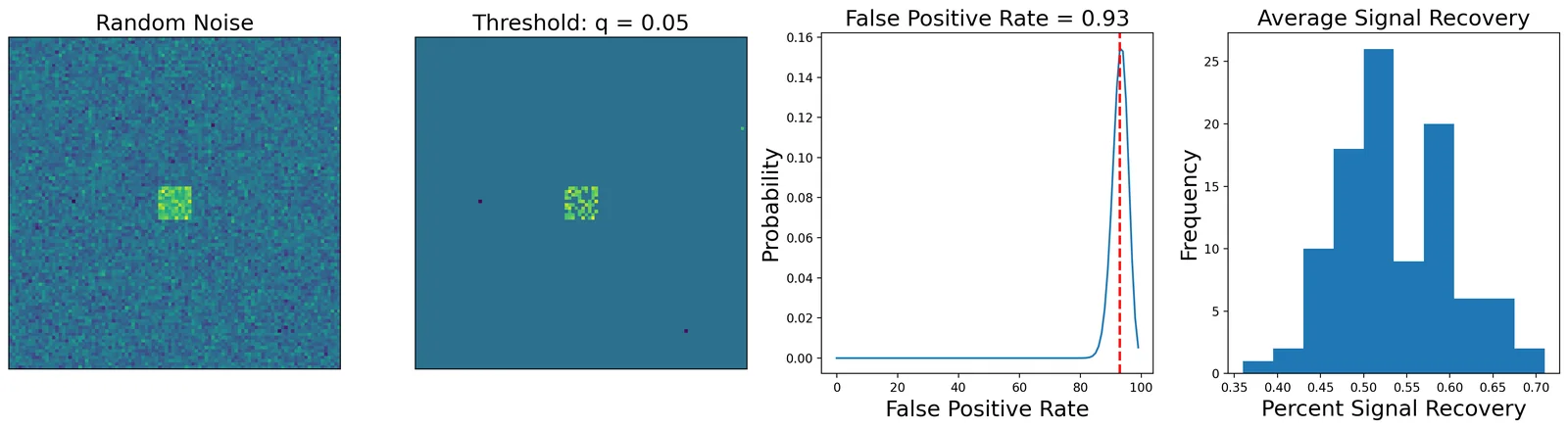
Okay, using FDR of q < 0.05 for our simulation identifies a p-value threshold of p < 0.00034. This is more liberal than the bonferroni threshold of p < 0.000005 and allows us to recover much more signal as a consequence. You can see that at this threshold there are more false positives, which leads to a much higher overall false positive rate. Remember, this metric is only used for calculating the family wise error rate and indicates the presence of any false positive across each of our 100 simulations.
To calculate the empirical false discovery rate, we need to calculate the percent of any activated voxels that were false positives.
_fig = go.Figure()
_fig.add_trace(go.Histogram(
    x=simulation_8.multiple_fdr, name='FDR',
    hovertemplate='FDR=%{x:.3f}<br>count=%{y}<extra></extra>',
))
_fig.update_layout(
    xaxis_title='False Discovery Rate',
    yaxis_title='Frequency',
    title='False Discovery Rate of Simulations',
    height=400,
    margin=dict(l=60, r=20, t=50, b=50),
)
_fig
In our 100 simulations, the majority had a false discovery rate below our q < 0.05.
Both Bonferroni and FDR share an assumption that we have quietly been making all along: that the p-value attached to each voxel is correct. Both procedures take a set of p-values as input and decide which ones to keep — neither of them checks where those p-values came from. They came from the \(t\) distribution, which is only the right reference distribution if the data are normally distributed and independent across subjects.
In the rest of this tutorial we will stop assuming and start building the null distribution from the data themselves.
Family Wise Error Rate
At this point you may be wondering if it even makes sense to assume that each test is independent. It seems reasonable to expect some degree of spatial correlation in our data. Our simulation is a good example of this as we have a square that contains signal across contiguous voxels. In practice, most of our functional neuroanatomy that we are investigating is larger than a single voxel and our spatial smoothing preprocessing step increase the spatial correlation.
It can be shown that the Bonferroni correction is overally conservative in the presence of spatial dependence and results in a decreased power to detect voxels that are truly active.
Let's watch a video by Martin Lindquist to learn more about different ways to control for the Family Wise Error Rate.
Permutation tests
As an alternative to assuming a parametric null distribution, nonparametric methods use the data themselves to find the appropriate distribution. These methods can provide substantial improvements in power and validity, particularly with small sample sizes, so we recommend these in general. They can also be used to verify the validity of the less computationally expensive parametric approaches.
For a one-sample test, the relevant procedure is a sign-flipping test. The logic is this: if a condition truly has no effect, then whether a given participant's value came out positive or negative is arbitrary. So we can generate a dataset that the null hypothesis could plausibly have produced by randomly flipping the sign of each participant's map, and recomputing the group statistic. Repeat this many times and you have an empirical null distribution — one that makes no assumption of normality at all.
nltools implements this in one_sample_permutation_test. Passing return_null=True gives us the full null distribution, with shape (n_permutations, n_voxels), rather than just the p-values. That null is the raw material for everything in the rest of this tutorial, so it is worth looking at directly.
We will drop down to a 30 x 30 grid with a small 6 x 6 square of true signal in the middle, which keeps the null distribution small enough to inspect.
N_PERMUTE = 1000
GRID_WIDTH = 30

perm_sim = SimulateGrid(
    grid_width=GRID_WIDTH, n_subjects=20,
    signal_width=6, signal_amplitude=1, random_state=0,
)

# SimulateGrid stores data as (width, width, n_subjects); the permutation
# test wants observations in rows, so (n_subjects, n_voxels).
perm_data = perm_sim.data.reshape(-1, perm_sim.n_subjects).T

# n_jobs=1 is deliberate: at this problem size the joblib pool costs more
# to spin up than the permutations themselves take to run.
with quiet():
    perm_result = one_sample_permutation_test(
        perm_data, n_permute=N_PERMUTE, return_null=True,
        random_state=0, n_jobs=1,
    )

perm_null = np.asarray(perm_result['null_dist'])
n_voxels = perm_null.shape[1]

print(f"null distribution shape: {perm_null.shape}  (n_permutations x n_voxels)")
print(f"smallest attainable p    = 1 / (1 + {N_PERMUTE}) = {1 / (N_PERMUTE + 1):.4f}")
print(f"smallest observed p      = {np.min(perm_result['p']):.4f}")
print(f"Bonferroni target for {n_voxels} voxels = {0.05 / n_voxels:.2e}")
null distribution shape: (1000, 900)  (n_permutations x n_voxels)
smallest attainable p    = 1 / (1 + 1000) = 0.0010
smallest observed p      = 0.0010
Bonferroni target for 900 voxels = 5.56e-05
A permutation p-value has a resolution limit
Look carefully at those last three numbers, because they contain a trap that is easy to walk into.
A permutation p-value is a proportion: out of all the permutations I ran, how many produced a statistic at least as extreme as the one I observed? If none of them did, the p-value is not zero — it is \(1/(n_{permute}+1)\), because the observed data is itself one of the possible arrangements. With 1,000 permutations, the smallest p-value that can exist is 0.001, and our most extreme voxel is sitting exactly on that floor.
Now compare that to the Bonferroni target of \(0.05 / 900 = 5.6 \times 10^{-5}\). It is more than an order of magnitude below the smallest number our permutation test is capable of producing. You cannot Bonferroni-correct 900 voxels using 1,000 permutations. No voxel can ever survive, no matter how strong the effect. To reach a whole-brain Bonferroni threshold this way you would need millions of permutations.
So classical corrections and permutation tests do not simply mix. If you feed permutation p-values into Bonferroni or FDR you will silently get an answer that is bounded by your computational budget rather than by your data.
The resolution to this is one of the more elegant ideas in the multiple comparisons literature, and it is the subject of the next section: instead of correcting per-voxel p-values, build a null distribution for the entire map at once.
# Show the null distribution for the single most extreme voxel.
_voxel = int(np.argmax(np.abs(perm_result['mean'])))
_observed = perm_result['mean'][_voxel]

_fig = go.Figure()
_fig.add_trace(go.Histogram(
    x=perm_null[:, _voxel], nbinsx=60, name='null (sign-flipped)',
    hovertemplate='statistic=%{x:.3f}<br>count=%{y}<extra></extra>',
))
_fig.add_vline(
    x=_observed, line=dict(color='red', width=3),
    annotation_text='observed', annotation_position='top right',
)
_fig.update_layout(
    xaxis_title='Group mean under the null',
    yaxis_title='Frequency',
    title=f'Sign-flip null distribution for the most extreme voxel (voxel {_voxel})',
    height=400,
    margin=dict(l=60, r=20, t=50, b=50),
)
_fig
Max-statistic correction
Here is the key move. We do not actually care about the null distribution of a voxel. We care about the null distribution of the largest value anywhere in the map, because a family-wise error is by definition the event that something, somewhere, crossed the line when it should not have.
So for each permutation, instead of keeping all 900 values, we keep only the maximum absolute value across the whole grid. That gives us one number per permutation and hence a null distribution of the maximum. The 95th percentile of that distribution is a threshold with a precise and very useful guarantee: under the complete null, the probability that any voxel in the map exceeds it is 5%.
This is a family-wise error rate correction, and it takes three lines. Note that it neatly sidesteps the resolution problem from the previous section — we are reading a percentile off a distribution rather than counting how many permutations beat a per-voxel value, so a 1,000-permutation budget is perfectly adequate.
def max_stat_threshold(null, alpha=0.05):
    """Critical value from the null distribution of the maximum statistic.

    `null` has shape (n_permutations, n_voxels). Taking the max across
    voxels collapses each permutation to a single number: the most extreme
    value anywhere in that permuted map.
    """
    return np.percentile(np.abs(null).max(axis=1), 100 * (1 - alpha))
_single_voxel = np.abs(perm_null[:, 0])
_map_max = np.abs(perm_null).max(axis=1)
_critical = max_stat_threshold(perm_null)

_fig = go.Figure()
_fig.add_trace(go.Histogram(
    x=_single_voxel, nbinsx=60, opacity=0.65,
    name='null for one voxel',
))
_fig.add_trace(go.Histogram(
    x=_map_max, nbinsx=60, opacity=0.65,
    name='null of the map maximum',
))
_fig.add_vline(
    x=_critical, line=dict(color='red', dash='dash', width=3),
    annotation_text=f'95th pct = {_critical:.3f}', annotation_position='top right',
)
_fig.update_layout(
    barmode='overlay',
    xaxis_title='|group mean| under the null',
    yaxis_title='Frequency',
    title='One voxel vs. the maximum over 900 voxels',
    height=420,
    margin=dict(l=60, r=20, t=50, b=50),
)
_fig
The two distributions are the whole story of multiple comparisons in one figure. The null for a single voxel is centered near zero. The null for the maximum over 900 voxels is shifted well to the right — because taking the largest of 900 draws from a null distribution reliably gives you a fairly large number. The gap between them is exactly the correction. Thresholding at the red line rather than at a single-voxel cutoff is what buys you FWER control.
Let's apply it and see how much of the true signal square we recover.
_critical = max_stat_threshold(perm_null)
_observed = np.abs(perm_result['mean']).reshape(GRID_WIDTH, GRID_WIDTH)
_survivors = (_observed > _critical).astype(float)

_f, _a = plt.subplots(ncols=3, figsize=(16, 5))
sns.heatmap(_observed, square=True, cmap='RdBu_r', ax=_a[0])
_a[0].set_title('Observed |group mean|', fontsize=15)
sns.heatmap(perm_sim.signal_mask, square=True, cmap='gray_r', cbar=False, ax=_a[1])
_a[1].set_title('True signal', fontsize=15)
sns.heatmap(_survivors, square=True, cmap='gray_r', cbar=False, ax=_a[2])
_a[2].set_title(f'Survives max-stat FWE (p < .05)\n{int(_survivors.sum())} voxels', fontsize=15)
plt.tight_layout()
plt.gcf()
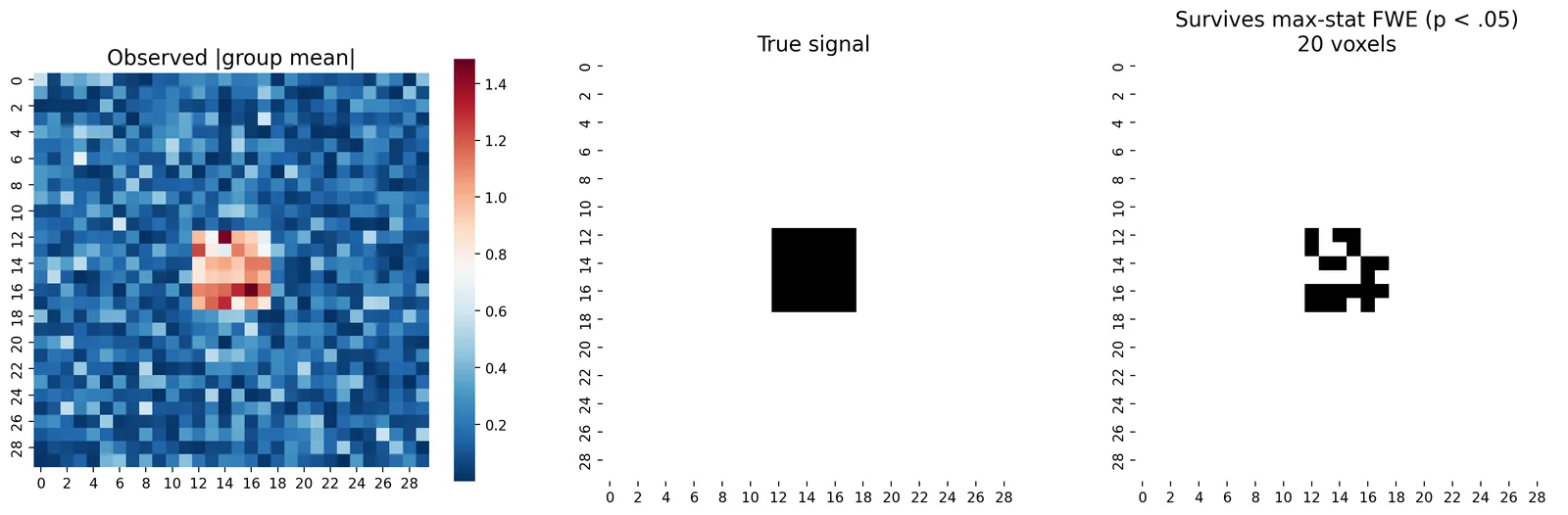
A threshold is only worth trusting if it does what it claims. We asserted that this procedure controls the family-wise error rate at 5% — so let's verify it, rather than take it on faith.
We generate 100 experiments containing no signal whatsoever, run the whole procedure on each, and count how often any voxel survives. If the correction is calibrated, that should happen about 5 times out of 100.
_rng = np.random.default_rng(1)
_n_sims, _n_subjects, _n_voxels = 100, 20, 900

_hits = 0
with quiet():
    for _i in range(_n_sims):
        _noise = _rng.standard_normal((_n_subjects, _n_voxels))
        _res = one_sample_permutation_test(
            _noise, n_permute=500, return_null=True,
            random_state=_i, n_jobs=1,
        )
        _null = np.asarray(_res['null_dist'])
        _hits += (np.abs(_res['mean']) > max_stat_threshold(_null)).any()

maxstat_fwe = _hits / _n_sims
_se = (maxstat_fwe * (1 - maxstat_fwe) / _n_sims) ** 0.5
print(f"Max-statistic FWE rate over {_n_sims} null experiments: "
      f"{maxstat_fwe:.1%} (+/- {1.96 * _se:.1%})")
print("Nominal alpha: 5.0%")
Max-statistic FWE rate over 100 null experiments: 4.0% (+/- 3.8%)
Nominal alpha: 5.0%
Cluster inference
Max-statistic correction controls errors at the level of individual voxels, which makes it strict. But we usually expect true activation to be spatially extended — a real effect should show up as a blob, not an isolated voxel. Cluster inference exploits this by asking a different question: not "is this voxel too high?" but "is this blob too big?" The classic implementation approximates the distribution of the maximum cluster size using Gaussian Random Field Theory (RFT), which attempts to account for the spatial dependence of the data.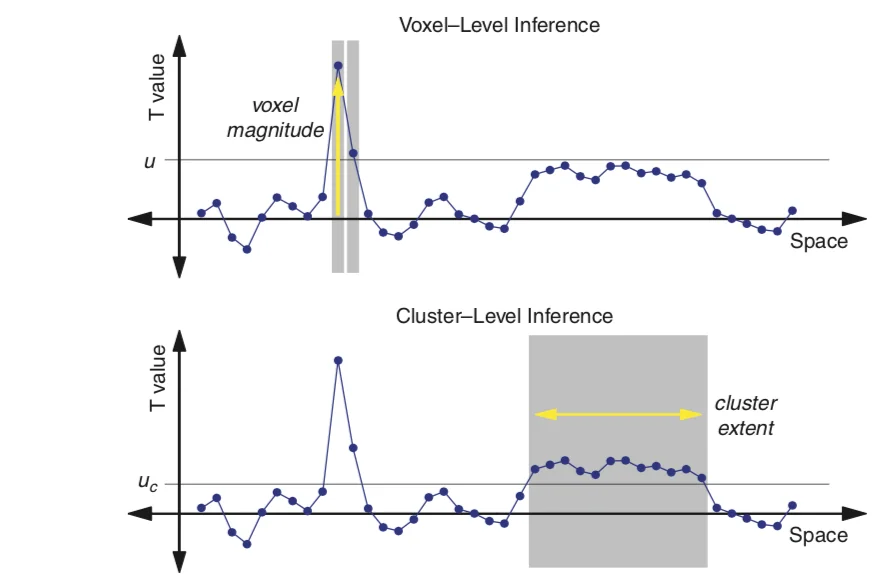 This requires specifying an initial threshold to determine the Euler Characteristic or the number of blobs minus the number of holes in the thresholded image. The number of voxels in the blob and the overall smoothness can be used to calculate something called resels or resolution elements and can be effectively thought of as the spatial units that need to be controlled for using FWER. We won't be going into too much detail with this approach as the mathematical details are somewhat complicated. In practice, if the image is smooth and the number of subjects is high enough (around 20), cluster correction seems to provide control closer to the true false positive rate than Bonferroni correction. Though we won't be spending time simulating this today, I encourage you to check out this Python simulation by Matthew Brett and this chapter for an introduction to random field theory.
 We can build the permutation version of this ourselves, and it is conceptually identical to the max-statistic procedure. Pick a cluster-forming threshold, apply it to each permuted map, find the largest surviving blob, and record its size. Do that for every permutation and you have a null distribution of the largest cluster size. Then ask where the observed cluster falls in that distribution.
One detail matters: cluster sizes are integers and heavily tied, so we use a permutation p-value,
We can build the permutation version of this ourselves, and it is conceptually identical to the max-statistic procedure. Pick a cluster-forming threshold, apply it to each permuted map, find the largest surviving blob, and record its size. Do that for every permutation and you have a null distribution of the largest cluster size. Then ask where the observed cluster falls in that distribution.
One detail matters: cluster sizes are integers and heavily tied, so we use a permutation p-value, > against a percentile is needlessly conservative when many null clusters have exactly the same size.def largest_cluster(mask2d):
"""Size in voxels of the largest contiguous blob in a boolean grid."""
labelled, n_found = label(mask2d)
return np.bincount(labelled.ravel())[1:].max() if n_found else 0
def cluster_fwe_p(observed, null, width, forming):
"""p = P(largest null cluster >= largest observed cluster).
`forming` is the cluster-forming threshold, applied identically to the
observed map and to every permuted map.
"""
null_max = np.array([
largest_cluster((np.abs(perm) > forming).reshape(width, width))
for perm in null
])
observed_size = largest_cluster((np.abs(observed) > forming).reshape(width, width))
if observed_size == 0:
return 1.0, 0, null_max
p_value = (np.sum(null_max >= observed_size) + 1) / (len(null_max) + 1)
return p_value, observed_size, null_max
Cluster inference requires spatially smooth data
Before we run it, there is an assumption hiding in this procedure that is easy to miss, and it turns out to be the crux of the whole cluster-inference controversy.
SimulateGrid generates each voxel independently — its noise is a plain randn(width, width, n_subjects), with no spatial structure at all. Real brain data is nothing like that: neighbouring voxels are correlated through the underlying physiology, through head motion, through interpolation during registration, and above all through the spatial smoothing we deliberately apply during preprocessing.
Cluster inference presupposes that correlation. If voxels really were independent, blobs would essentially never form by chance, the null distribution of cluster size would collapse onto 1 or 2 voxels, and the test would be degenerate.
Let's demonstrate this directly by running the identical procedure twice — once on independent noise, and once on the same noise after applying a Gaussian filter.
def run_cluster_calibration(smoothing_sigma, n_sims=100, width=30, n_subjects=20,
                            n_permute=500, alpha=0.05):
    """Family-wise error rate of the cluster test under the complete null."""
    rng = np.random.default_rng(2)
    hits, observed_sizes = 0, []
    with quiet():
        for i in range(n_sims):
            data = rng.standard_normal((n_subjects, width, width))
            if smoothing_sigma:
                data = np.stack([gaussian_filter(x, sigma=smoothing_sigma) for x in data])
                data = data / data.std()          # renormalize after smoothing
            res = one_sample_permutation_test(
                data.reshape(n_subjects, -1), n_permute=n_permute,
                return_null=True, random_state=i, n_jobs=1,
            )
            null = np.asarray(res['null_dist'])
            forming = np.percentile(np.abs(null), 99)
            p_value, size, _ = cluster_fwe_p(res['mean'], null, width, forming)
            hits += p_value < alpha
            observed_sizes.append(size)
    return hits / n_sims, float(np.median(observed_sizes))

cluster_calibration = pd.DataFrame(
    [
        {'smoothing sigma': _s,
         'cluster FWE rate': _rate,
         'median largest cluster (voxels)': _median}
        for _s in (0, 2.0)
        for _rate, _median in [run_cluster_calibration(_s)]
    ]
)
cluster_calibration
| smoothing sigma | cluster FWE rate | median largest cluster (voxels) | |
|---|---|---|---|
| 0 | 0.0 | 0.01 | 1.0 |
| 1 | 2.0 | 0.03 | 5.0 |
Look at the right-hand column first, because it is the stable result: on independent noise the largest blob you can expect to find is about 1 voxel, while after smoothing it is around 5 voxels. The cluster test has essentially nothing to work with in the unsmoothed case — there is no meaningful distribution of cluster sizes, so the test cannot discriminate.
The error rates in the middle column point the same direction, but treat them with more caution than the tidy story usually told about them: with only 100 simulations the Monte Carlo error on a rate near 5% is roughly ±4%, so the two numbers are not as far apart as they look. Do not over-read a single run — if you re-run this cell with a different seed the rates will move around noticeably, while the median cluster sizes will not.
The general lesson is robust, and it is the mechanism behind Eklund, Nichols & Knutsson (2016): the validity of cluster inference depends entirely on how well you have modelled the spatial autocorrelation of your data. Eklund et al. found that the parametric (RFT) implementations in the major software packages were mis-modelling that autocorrelation and, as a result, producing false-positive rates far above nominal — in some configurations up to 70% instead of 5%.
This is why cluster extent thresholding has become controversial. A related paper by Woo et al. 2014 showed that a liberal initial threshold (i.e. higher than p < 0.001) will inflate the number of false positives above the nominal level of 5%. There is no optimal way to select the initial threshold and often slight changes will give very different results. Furthermore, this approach does not appear to work equally well across all types of findings, and it seems potentially problematic to assume that spatial smoothness is constant over the brain. Finally, it is important to note that this approach only allows us to make inferences for the entire cluster. We can say that there is some voxel in the cluster that is significant, but we can't really pinpoint which voxels within the cluster may be driving the effect.
Nonparametric cluster inference of the kind we just built is considerably more defensible than the parametric version, because it estimates the null distribution of cluster size from the data instead of assuming a functional form for the smoothness. But the interpretational limitation — inference is about the blob, not the voxel — remains.
Threshold Free Cluster Enhancement
One interesting solution to the issue of finding an initial threshold seems to be addressed by the threshold free cluster enhancement method presented in Smith & Nichols, 2009. In this approach, the authors propose a way to combine cluster extent and voxel height into a single metric that does not require specifying a specific initial threshold. It essentially involves calculating the integral of the overall product of a signal intensity and spatial extent over multiple thresholds. It has been shown to perform particularly well when combined with non-parameteric resampling approaches such as randomise in FSL. For more details about this approach check out this blog post by Mark Thornton, this video by Jeanette Mumford, and the original technical report.
Parametric simulations
One approach to estimating the inherent smoothness in the data, or it's spatial autocorrelation, is using parametric simulations. This was the approach originally adopted in AFNI's AlphaSim/3DClustSim. After it was demonstrated that real fMRI data was not adequately modeled by a standard Gaussian distribution, the AFNI group quickly updated their software and implemented a range of different algorithms in their 3DClustSim tool. See this paper for an overview of these changes.
Thresholding Brain Maps
In the remainder of the tutorial, we will move from simulation to playing with real data.
Let's watch another video by Tor Wager on how multiple comparison approaches are used in practice, highlighting some of the pitfalls with some of the different approaches.
We will be exploring two simple and fast ways to threshold your group analyses.
First, we will simply threshold based on selecting an arbitrary statistical threshold. The values are completely arbitrary, but it is common to start with something like p < .001. We call this uncorrected because this is simply the threshold for any voxel as we are not controlling for multiple tests.
con1_name = 'horizontal_checkerboard'
con1_file_list = [localizer.get_file(sub, 'betas', con1_name) for sub in localizer.get_subjects()]
con1_dat = BrainData(con1_file_list)

# Estimating and thresholding are now two separate steps: .ttest() returns
# the unthresholded maps, and `threshold` masks the t-map by the p-map.
con1_stats = con1_dat.ttest()
threshold(con1_stats['t'], con1_stats['p'], thr=0.001).iplot()
Warning: You are sending unauthenticated requests to the HF Hub. Please set a HF_TOKEN to enable higher rate limits and faster downloads.
We see some significant activations in visual cortex, but we also see strong t-tests in the auditory cortex.
Why do you think this is?
Because thresholding is now its own step, swapping in FDR correction just means computing a different cutoff. fdr() returns the p-value threshold that controls the false discovery rate at q, and we feed that to the same threshold call.
One thing to watch: if nothing survives, fdr() returns -1. Always branch on that rather than passing it straight through — thresholding at a negative p-value keeps every voxel, which would turn a null result into a whole-brain activation map.
_fdr_thr = fdr(con1_stats['p'].data, q=0.05)
if _fdr_thr > 0:
    print(f"FDR threshold: p < {_fdr_thr:.5f}")
    _thresholded = threshold(con1_stats['t'], con1_stats['p'], thr=_fdr_thr)
    _view = _thresholded.iplot()
else:
    _view = mo.md('Nothing survives FDR correction for this contrast.')
_view
FDR threshold: p < 0.00052
You can see that at least for this particular contrast, the FDR threshold appears to be more liberal than p < 0.001 uncorrected.
Let's look at another contrast between vertical and horizontal checkerboards.
con2_name = 'vertical_checkerboard'
con2_file_list = [localizer.get_file(sub, 'betas', con2_name) for sub in localizer.get_subjects()]
con2_dat = BrainData(con2_file_list)
con1_v_con2 = con1_dat - con2_dat

con1_v_con2_stats = con1_v_con2.ttest()
threshold(con1_v_con2_stats['t'], con1_v_con2_stats['p'], thr=0.001).iplot()
_fdr_thr = fdr(con1_v_con2_stats['p'].data, q=0.05)
if _fdr_thr > 0:
    _view = threshold(con1_v_con2_stats['t'], con1_v_con2_stats['p'], thr=_fdr_thr).iplot()
else:
    _view = mo.md('Nothing survives FDR correction for this contrast.')
_view
Nothing survives FDR correction for this contrast.
Permutation-based correction on real data
Everything we built by hand on the simulated grid also exists in production form. nltools gives us the sign-flipping test and the descriptive tools, but the FWE-calibrated corrections — max-statistic, cluster extent, cluster mass, and TFCE — come from nilearn. It is worth being explicit about that boundary, because it is a realistic picture of how the Python neuroimaging stack composes: no single package does everything, and you will routinely move data between them.
nilearn.glm.second_level.non_parametric_inference returns all of these from a single call. For a one-sample group test, the design matrix is just a column of ones — an intercept — which is the second-level equivalent of "test whether the group mean differs from zero".
The `threshold` argument of `non_parametric_inference` is a **p-value**, not a t-value. nilearn converts it to a t-statistic internally using the model's degrees of freedom. Passing something like `threshold=2.5` thinking it is a cluster-forming t-threshold does not raise an error: internally it computes `t.isf(1.25, df)`, which is `NaN`, every `array > NaN` comparison is `False`, and you silently get back cluster maps that are **entirely zero** while the voxel-level `logp_max_t` output still looks perfectly reasonable. Always pass a p-value here.
group_design = pd.DataFrame({'intercept': np.ones(len(con1_dat))})
con1_imgs = [con1_dat[_i].to_nifti() for _i in range(len(con1_dat))]

npi_cluster = non_parametric_inference(
    con1_imgs,
    design_matrix=group_design,
    second_level_contrast='intercept',
    mask=con1_dat.mask,
    n_perm=500,
    threshold=0.001,        # p-scale cluster-forming threshold, NOT a t-value
    tfce=False,
    two_sided_test=True,
    n_jobs=-1,
    random_state=0,
)
print(list(npi_cluster.keys()))
/tmp/marimo_3182/__marimo__cell_IaQp_.py:4: UserWarning: Data array used to create a new image contains 64-bit ints. This is likely due to creating the array with numpy and passing `int` as the `dtype`. Many tools such as FSL and SPM cannot deal with int64 in Nifti images, so for compatibility the data has been converted to int32.
  npi_cluster = non_parametric_inference(
['t', 'logp_max_t', 'size', 'logp_max_size', 'mass', 'logp_max_mass']
The outputs pair up: t is the observed statistic map, and each logp_max_* map holds \(-\log_{10}(p)\) for a different FWE-corrected procedure.
| output | correction |
|---|---|
logp_max_t |
voxel-level FWE (the max-statistic procedure we built above) |
logp_max_size |
cluster-extent FWE |
logp_max_mass |
cluster-mass FWE (extent weighted by height) |
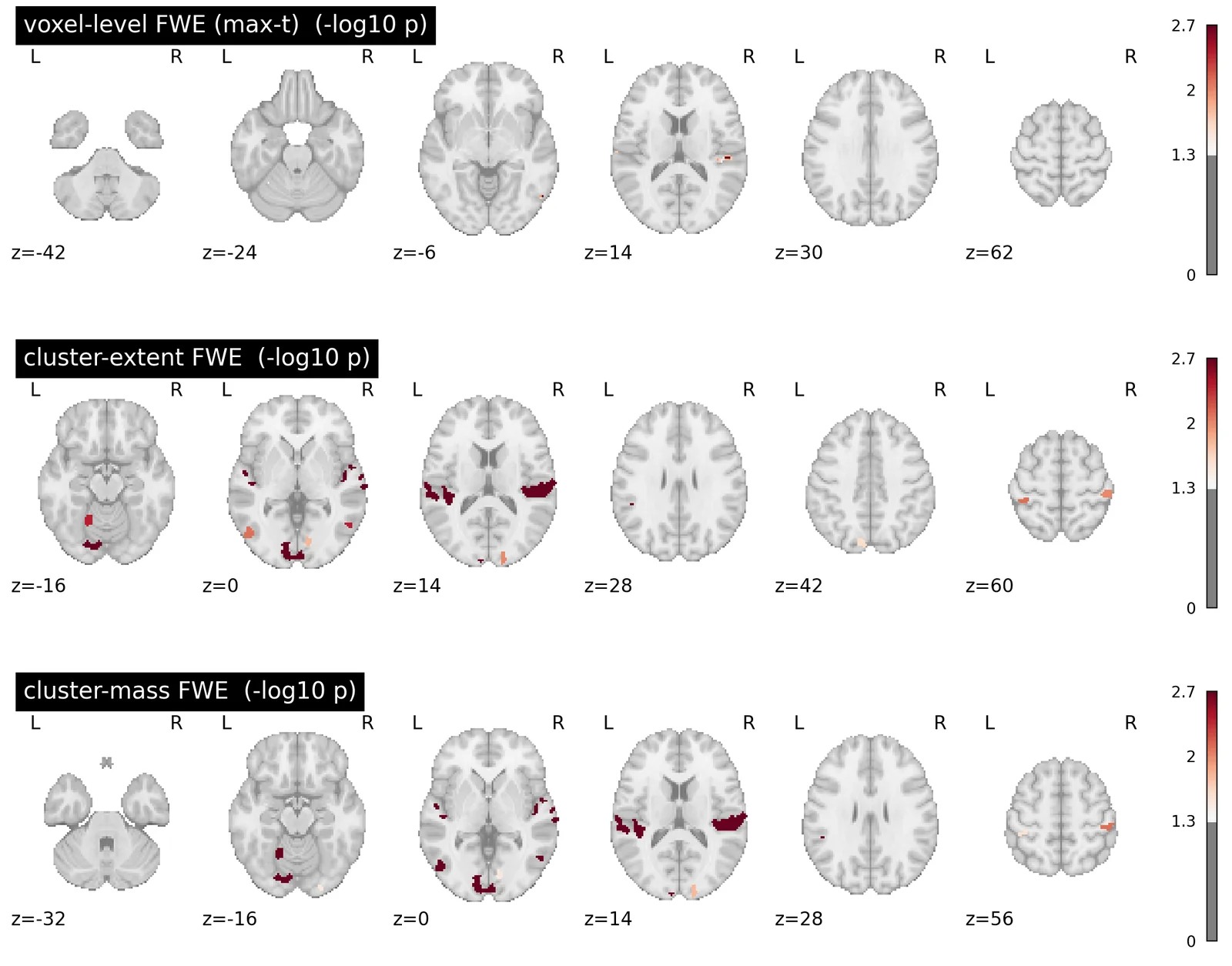
Because these are \(-\log_{10}\) p-values, "survives at p < .05" means the value exceeds \(-\log_{10}(0.05) \approx 1.30\). Let's count survivors under each.
_alpha_logp = -np.log10(0.05)
correction_comparison = pd.DataFrame([
    {
        'correction': _label,
        'voxels surviving p < .05': int(np.sum(npi_cluster[_key].get_fdata() > _alpha_logp)),
    }
    for _key, _label in [
        ('logp_max_t', 'voxel-level FWE (max-t)'),
        ('logp_max_size', 'cluster-extent FWE'),
        ('logp_max_mass', 'cluster-mass FWE'),
    ]
])
correction_comparison
| correction | voxels surviving p < .05 | |
|---|---|---|
| 0 | voxel-level FWE (max-t) | 180 |
| 1 | cluster-extent FWE | 3226 |
| 2 | cluster-mass FWE | 3269 |
The ordering is the point. Voxel-level FWE is the strictest — it only keeps voxels whose individual height is extreme enough to beat the map maximum. The cluster-based procedures keep far more, because they are willing to credit a voxel of moderate height that happens to sit inside a large blob.
That extra sensitivity is not free. Remember what a cluster-level result licenses you to say: this blob contains signal somewhere. It does not license any claim about a particular voxel inside it, even though the picture strongly invites one.
_alpha_logp = -np.log10(0.05)
_f, _a = plt.subplots(nrows=3, figsize=(14, 11))
for _ax, (_key, _label) in zip(_a, [
    ('logp_max_t', 'voxel-level FWE (max-t)'),
    ('logp_max_size', 'cluster-extent FWE'),
    ('logp_max_mass', 'cluster-mass FWE'),
]):
    plot_stat_map(
        npi_cluster[_key], threshold=_alpha_logp, display_mode='z',
        cut_coords=6, axes=_ax, title=f'{_label}  (-log10 p)', colorbar=True,
    )
plt.gcf()
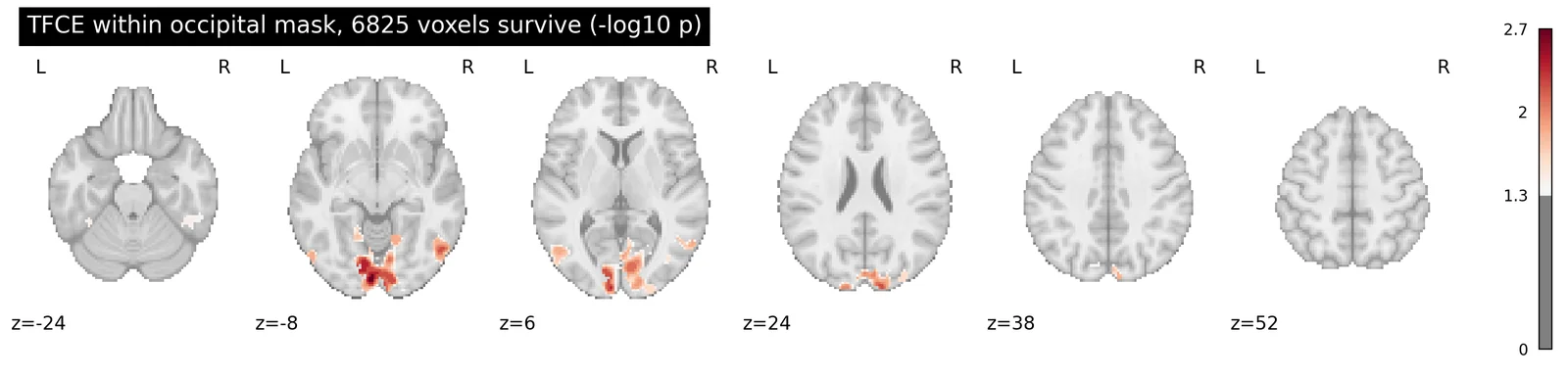
TFCE, and paying attention to what things cost
TFCE is the fourth procedure, and it is requested with tfce=True instead of a threshold. It is also dramatically more expensive than the others: on this dataset a whole-brain TFCE run costs roughly 15 seconds per permutation, so a respectable 500-permutation analysis would take around two hours. Setting two_sided_test=True doubles it again.
That cost scales with the number of voxels, which gives us a practical strategy that also happens to be good statistical practice. If you have an a priori anatomical hypothesis, restrict the analysis to that volume. You test fewer voxels (so the correction is less punishing) and the computation becomes tractable. This is the same "small volume correction" idea from the very first simulation in this tutorial, where shrinking the grid from 100 x 100 to 5 x 5 collapsed the false positive rate.
Our contrast is a visual checkerboard, so let's restrict to occipital cortex using the probabilistic Harvard-Oxford atlas. This cuts the search volume from ~239,000 voxels to ~32,000, and brings a 500-permutation TFCE run down to about a minute.
ho_labels = pd.read_csv(fetch_resource('atlases/labels_harvard_oxford.csv'))

# The Harvard-Oxford resource is a 4D *probabilistic* atlas: one volume per
# region, holding the probability (0-100) that each voxel belongs to it.
# Passing mask= resamples it into the same 2mm space as our data.
ho_atlas = BrainData(fetch_resource('atlases/atlas_harvard_oxford.nii.gz'), mask=con1_dat.mask)

occipital_rows = ho_labels.index[
    ho_labels.name.str.contains('Occipital|Lingual|Calcarine|Cuneal', case=False)
].tolist()

occipital_mask = con1_dat[0].copy()
occipital_mask.data = (ho_atlas[occipital_rows].data.max(axis=0) > 25).astype(float)

print(f"{len(occipital_rows)} occipital regions -> "
      f"{int(occipital_mask.data.sum())} voxels of {con1_dat.shape[1]}")
22 occipital regions -> 31647 voxels of 238955
with mo.persistent_cache("threshold_tfce", store=storage.cache_store() if storage_ready else None):
    npi_tfce = non_parametric_inference(
        con1_imgs,
        design_matrix=group_design,
        second_level_contrast='intercept',
        mask=occipital_mask.to_nifti(),
        n_perm=500,
        threshold=None,
        tfce=True,
        two_sided_test=True,
        n_jobs=-1,
        random_state=0,
    )
print(list(npi_tfce.keys()))
['t', 'logp_max_t', 'tfce', 'logp_max_tfce']
_alpha_logp = -np.log10(0.05)
_n_survivors = int(np.sum(npi_tfce['logp_max_tfce'].get_fdata() > _alpha_logp))
plot_stat_map(
    npi_tfce['logp_max_tfce'], threshold=_alpha_logp, display_mode='z', cut_coords=6,
    title=f'TFCE within occipital mask, {_n_survivors} voxels survive (-log10 p)',
    colorbar=True,
)
plt.gcf()
Reporting what survived
Once you have a corrected map, the last step is describing it: where are the surviving clusters, how big are they, and what anatomy do they cover? nltools provides cluster_report for this, which will also label peaks against an atlas.
This step is **descriptive, not corrective**. `cluster_report(cluster_threshold=...)` drops small clusters from the *table*; it does not compute a null distribution and it does not control any error rate. The `cluster_threshold` argument here is a display convenience and is a completely different thing from the cluster-extent FWE procedure above, despite the similar name. Do the correction first, then report.
cluster_rep = con1_stats['t'].cluster_report(
    stat_threshold=3.0,
    cluster_threshold=25,
    atlas='harvard_oxford',
)
cluster_rep.clusters
| cluster_id | peak_x | peak_y | peak_z | mean_stat | volume_mm3 | n_voxels | harvard_oxford |
|---|---|---|---|---|---|---|---|
| i64 | f64 | f64 | f64 | f64 | f64 | i64 | str |
| 1 | 56.0 | -66.0 | -6.0 | 3.60554 | 54360.0 | 6795 | "11.8% no_label; 10.1% Right_Oc… |
| 2 | 38.0 | -20.0 | 12.0 | 4.068818 | 15416.0 | 1927 | "22.2% Right_Planum_Temporale; … |
| 3 | -40.0 | -32.0 | 10.0 | 4.072462 | 11816.0 | 1477 | "35.1% Left_Planum_Temporale; 1… |
| 4 | -58.0 | -28.0 | 50.0 | 3.48707 | 6384.0 | 798 | "48.9% Left_Postcentral_Gyrus; … |
| 5 | 46.0 | -30.0 | 62.0 | 3.60135 | 3600.0 | 450 | "80.9% Right_Postcentral_Gyrus;… |
| … | … | … | … | … | … | … | … |
| 24 | -2.0 | 4.0 | -2.0 | 3.343677 | 216.0 | 27 | "40.7% Left_Lateral_Ventrical; … |
| 25 | 22.0 | -14.0 | 78.0 | 3.27782 | 208.0 | 26 | "88.5% Right_Precentral_Gyrus; … |
| 26 | -18.0 | -50.0 | -48.0 | 3.247461 | 208.0 | 26 | "100.0% no_label" |
| 27 | -20.0 | 24.0 | 14.0 | 3.661875 | 208.0 | 26 | "65.4% no_label; 34.6% Left_Lat… |
| 28 | 10.0 | 14.0 | -10.0 | 3.374491 | 200.0 | 25 | "52.0% Right_Accumbens; 48.0% R… |
.clusters gives one row per cluster with its peak coordinate, size, and atlas composition; .peaks gives the individual local maxima within each cluster. Both are Polars dataframes, and .to_csv() will write them out for a paper's table.
| cluster_id | x | y | z | peak_stat | volume_mm3 | n_voxels | harvard_oxford |
|---|---|---|---|---|---|---|---|
| i64 | f64 | f64 | f64 | f64 | f64 | i64 | str |
| 2 | 38.0 | -20.0 | 12.0 | 7.049734 | 15416.0 | 1927 | "34.0% Right_Insular_Cortex; 28… |
| 2 | 50.0 | -26.0 | 14.0 | 6.980747 | 15416.0 | 1927 | "49.0% Right_Planum_Temporale; … |
| 2 | 40.0 | -28.0 | 14.0 | 6.262396 | 15416.0 | 1927 | "43.0% Right_Planum_Temporale; … |
| 2 | 60.0 | -32.0 | 8.0 | 6.257494 | 15416.0 | 1927 | "17.0% Right_Superior_Temporal_… |
| 3 | -40.0 | -32.0 | 10.0 | 6.902028 | 11816.0 | 1477 | "54.0% Left_Planum_Temporale; 5… |
| … | … | … | … | … | … | … | … |
| 2 | 66.0 | -24.0 | 30.0 | 3.058877 | 15416.0 | 1927 | "78.0% Right_Supramarginal_Gyru… |
| 1 | -8.0 | -98.0 | -20.0 | 3.047951 | 54360.0 | 6795 | "16.0% Left_Occipital_Pole" |
| 2 | 66.0 | -2.0 | -4.0 | 3.021673 | 15416.0 | 1927 | "21.0% Right_Superior_Temporal_… |
| 16 | -46.0 | -6.0 | 38.0 | -3.915287 | 320.0 | 40 | "35.0% Left_Precentral_Gyrus" |
| 16 | -54.0 | -6.0 | 48.0 | -3.229463 | 320.0 | 40 | "69.0% Left_Precentral_Gyrus" |
This concludes our overview of thresholding and multiple comparisons correction in fMRI data analysis.
The practical summary: uncorrected thresholds do not control anything at the level of the map. Bonferroni and FDR operate on parametric p-values and are easy to apply, but Bonferroni is badly over-conservative in the presence of spatial correlation. Permutation tests make no distributional assumptions and give you the null distribution itself, from which max-statistic, cluster, and TFCE corrections all follow. And whichever you choose, be clear about what the result licenses you to claim — a cluster-level result is a statement about a blob, not about a voxel.
We will continue to add more advanced tutorials to the dartbrains.org website. Stay tuned!
Exercises
Exercise 1. Bonferroni Correction Simulation
Using the Grid Simulation code above, try to find how much larger the signal needs to be using a Bonferroni Correction until we can recover 100% of the true signal, while controlling a family wise error false-positive rate of p < 0.05.
Exercise 2. Which regions are more involved with visual compared to auditory sensory processing?
- run a group level t-test and threshold using an uncorrected voxel-wise threshold of p < 0.05, p < 0.005, and p < 0.001.
- plot each of the results
- write each file to your output folder.
Exercise 3. Which regions are more involved in processing numbers compared to words?
- run a group level t-test, using a correcte FDR threshold of q < 0.05.
- plot the results
- write the file to your output folder.
Exercise 4. How many permutations do you need?
The max-statistic section used 1,000 permutations. Re-run the permutation test on the 30 x 30 grid with n_permute set to 100, 500, and 5,000.
- How does the smallest attainable p-value change?
- How much does the max-statistic threshold move between runs?
- At what point does adding more permutations stop changing your answer?
Exercise 5. Cluster-forming thresholds are a researcher degree of freedom
The cluster simulation used the 99th percentile of the null as the cluster-forming threshold. Re-run run_cluster_calibration with a more liberal threshold (say the 95th percentile) by editing the function.
- Does the family-wise error rate stay at 5%?
- How does the median cluster size change?
- Relate what you find to the argument in Woo et al. (2014).
Assignment: Thresholding Group Analyses
- Setup
- Q1. How big does the signal have to be to survive Bonferroni?
- Q2. What does FDR buy you over Bonferroni?
- Q3. How many permutations do you need?
- Q4. The cluster-forming threshold is a researcher degree of freedom
- Q5. What the liberal threshold actually costs you