Preprocessing
Written by Luke Chang
Being able to study brain activity associated with cognitive processes
in humans is an amazing achievement. However, there is an extraordinary
amount of noise and very low levels of signal, which makes it difficult
to make inferences about brain function using BOLD imaging. A critical
step before any analysis is to remove as much noise as possible. The
series of steps to remove noise comprise our neuroimaging data
preprocessing pipeline. See slides on our preprocessing lecture here.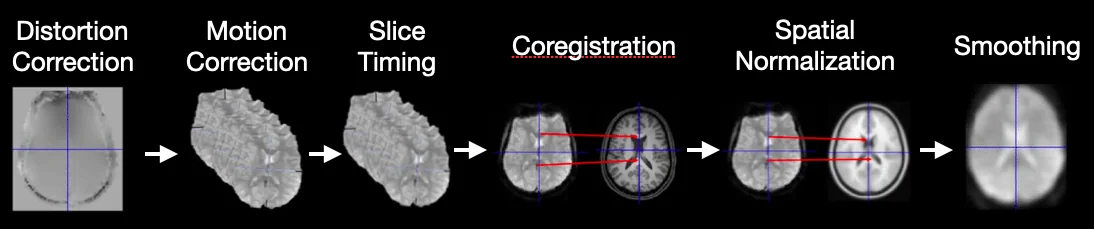 In this lab, we will go over the basics of preprocessing fMRI data using the fmriprep preprocessing pipeline. We will cover:
In this lab, we will go over the basics of preprocessing fMRI data using the fmriprep preprocessing pipeline. We will cover:
- Image transformations (rigid body and affine)
- Cost functions for image registration
- Head motion correction (realignment)
- Spatial normalization
- Spatial smoothing
- fMRIPrep automated preprocessing pipeline
Image Transformations
Ok, now let’s dive deeper into how we can transform images into different spaces using linear transformations. Recall from our introduction to neuroimaging data lab, that neuroimaging data is typically stored in a nifti container, which contains a 3D or 4D matrix of the voxel intensities and also an affine matrix that maps voxel coordinates- 3 translations (shift in x, y, z)
- 3 rotations (around x, y, z axes)
- 3 scale factors
- 3 shear parameters
Translation:
Cost Functions
Now that we understand affine transformations, how do we use them to register one brain image to another? We need a way to quantify how well two images are aligned. The key is to identify a way to quantify how aligned the two images are to each other. Our visual systems are very good at identifying when two images are aligned, however, we need to create a quantitative alignment measure. These measures are called cost functions. A common cost function is the Sum of Squared Errors (SSE). You may remember that this same cost function is used by linear regression to find the best fitting line to data. This measure works best if the images are of the same type and have roughly equivalent signal intensities.| Cost Function | Use Case | Example |
|---|---|---|
| Sum of Squared Error | Same modality & scaling | Two T2* images |
| Normalized correlation | Same modality | Two T1 images |
| Correlation ratio | Any modality | T1 and FLAIR |
| Mutual information | Any modality | T1 and CT |
| Boundary Based Registration | Contrast across boundaries | EPI and T1 |
Realignment
Now let's put everything we learned together to understand how we can correct for head motion in functional images that occurred during a scanning session. It is extremely important to make sure that a specific voxel has the same 3D coordinate across all time points to be able to model neural processes. This of course is made difficult by the fact that participants move during a scanning session and also in between runs. Realignment is the preprocessing step in which a rigid body transformation is applied to each volume to align them to a common space. One typically needs to choose a reference volume, which might be the first, middle, or last volume, or the mean of all volumes. Let's look at an example of the translation and rotation parameters after running realignment on our first subject.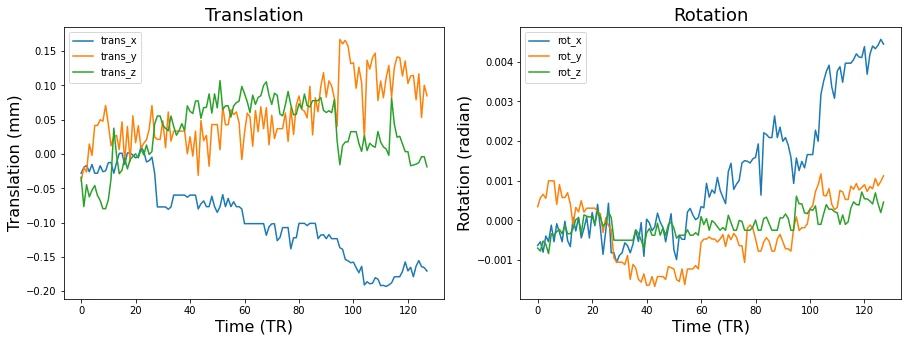 Don't forget that even though we can approximately put each volume into a similar position with realignment, head motion always distorts the magnetic field and can lead to nonlinear changes in signal intensity that will not be addressed by this procedure. In the resting-state literature, where many analyses are based on functional connectivity, head motion can lead to spurious correlations. Some researchers choose to exclude any subject that moved more than a certain amount. Others choose to remove the impact of these time points in their data through removing the volumes via scrubbing or modeling out the volume with a dummy code in the first level general linear models.
Spatial Normalization
There are several other preprocessing steps that involve image registration. The main one is called spatial normalization, in which each subject's brain data is warped into a common stereotactic space. Talairach is an older space, that has been subsumed by various standards developed by the Montreal Neurological Institute. There are a variety of algorithms to warp subject data into stereotactic space. Linear 12 parameter affine transformations have increasingly been replaced by more complicated nonlinear normalizations that have hundreds to thousands of parameters. One nonlinear algorithm that has performed very well across comparison studies is diffeomorphic registration, which can also be inverted so that subject space can be transformed into stereotactic space and back to subject space. This is the core of the ANTs algorithm that is implemented in fmriprep. Let's watch another short video by Martin Lindquist and Tor Wager to learn more about the core preprocessing steps.There are many different steps involved in the spatial normalization process and these details vary widely across various imaging software packages. We will briefly discuss some of the steps involved in the anatomical preprocessing pipeline implemented by fMRIprep and will be showing example figures from the output generated by the pipeline.
First, brains are extracted from the skull and surrounding dura mater. You can check and see how well the algorithm performed by examining the red outline.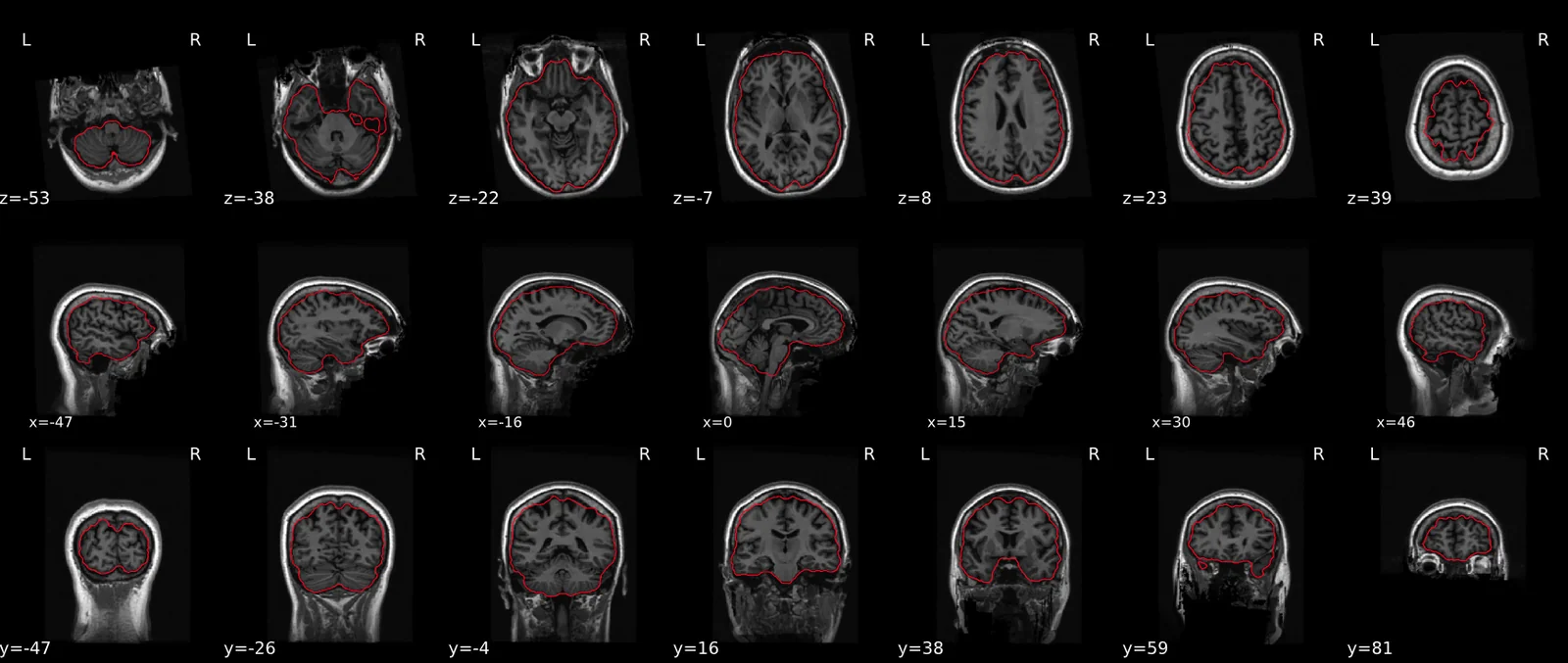 Next, the anatomical images are segmented into different tissue types. These tissue maps are used for various types of analyses, including providing a grey matter mask to reduce the computational time in estimating statistics. In addition, they provide masks to aid in extracting average activity in CSF, or white matter, which might be used as covariates in the statistical analyses to account for physiological noise.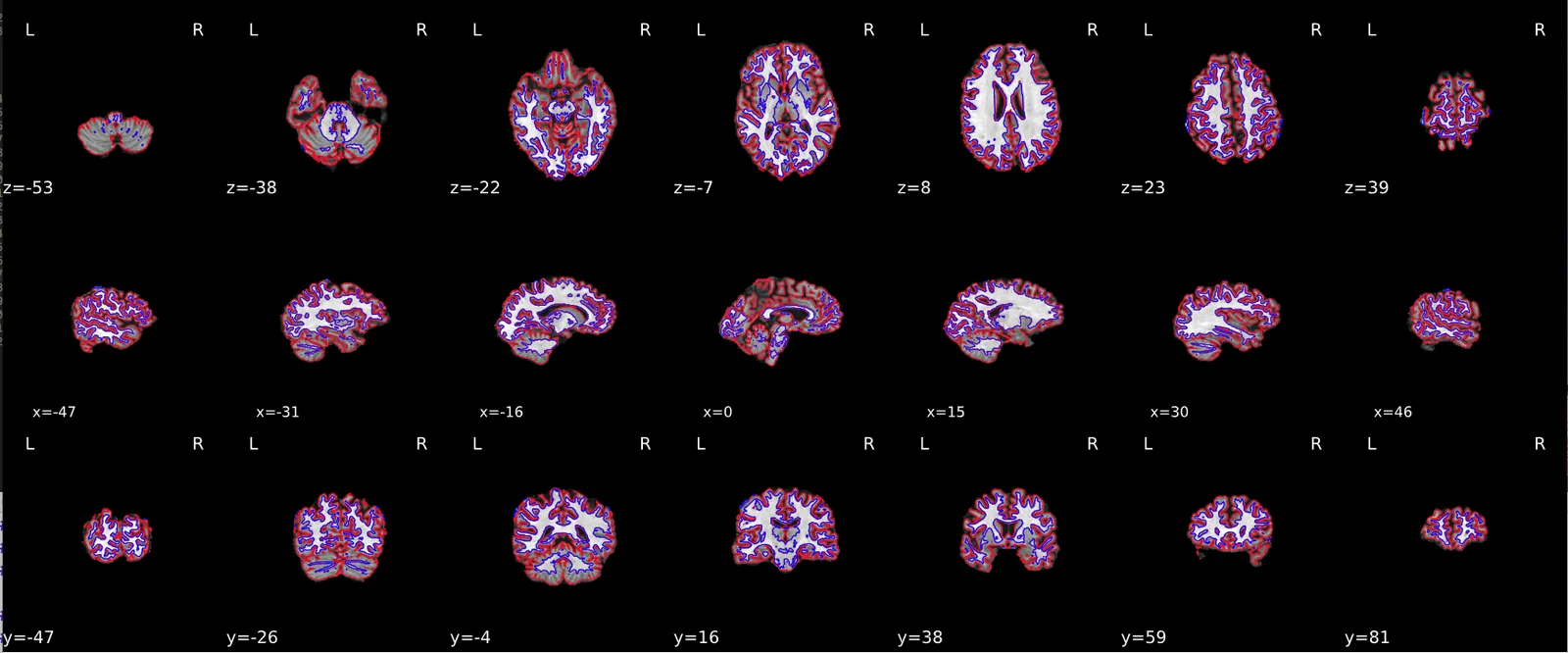
Next, the anatomical images are segmented into different tissue types. These tissue maps are used for various types of analyses, including providing a grey matter mask to reduce the computational time in estimating statistics. In addition, they provide masks to aid in extracting average activity in CSF, or white matter, which might be used as covariates in the statistical analyses to account for physiological noise.Spatial normalization of the anatomical T1w reference
fmriprep uses ANTs to perform nonlinear spatial normalization. It is easy to check to see how well the algorithm performed by viewing the results of aligning the T1w reference to the stereotactic reference space. Hover on the panels with the mouse pointer to transition between both spaces. We are using the MNI152NLin2009cAsym template.Alignment of functional and anatomical MRI data
Next, we can evaluate the quality of alignment of the functional data to the anatomical T1 image. FSLflirt was used to generate transformations from EPI-space to T1w-space — the white matter mask calculated with FSL fast (brain tissue segmentation) was used for BBR. Note that Nearest Neighbor interpolation is used in the reportlets in order to highlight potential spin-history and other artifacts, whereas final images are resampled using Lanczos interpolation. Notice these images are much blurrier and show some distortion compared to the T1s.
Spatial Smoothing
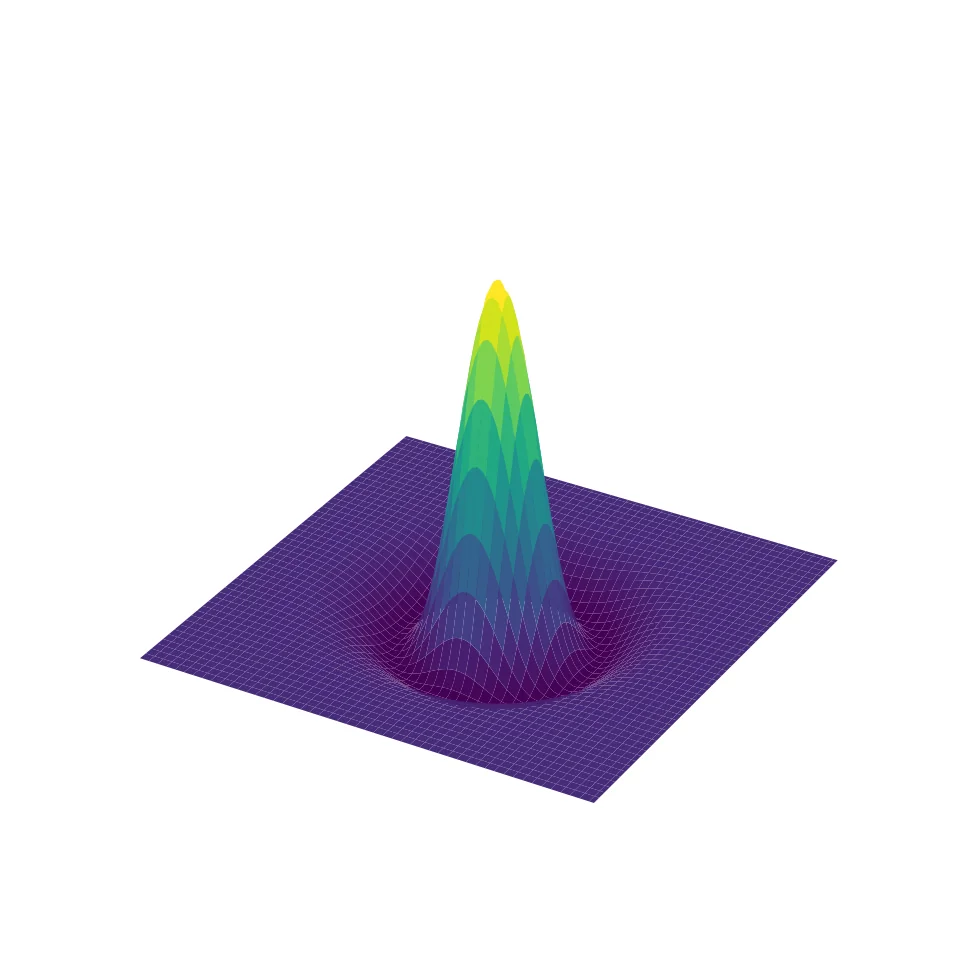
Spatial smoothing applies a 3D Gaussian kernel to each volume, blurring the image to remove high-frequency spatial noise. The amount of smoothing is specified by the Full Width at Half Maximum (FWHM) of the Gaussian kernel. Why blur the image after trying so hard to increase resolution?- Increases signal-to-noise ratio
- Reduces impact of partial volume effects
- Compensates for residual misalignment after normalization
- Satisfies assumptions of Random Field Theory for multiple comparisons correction
fmriprep
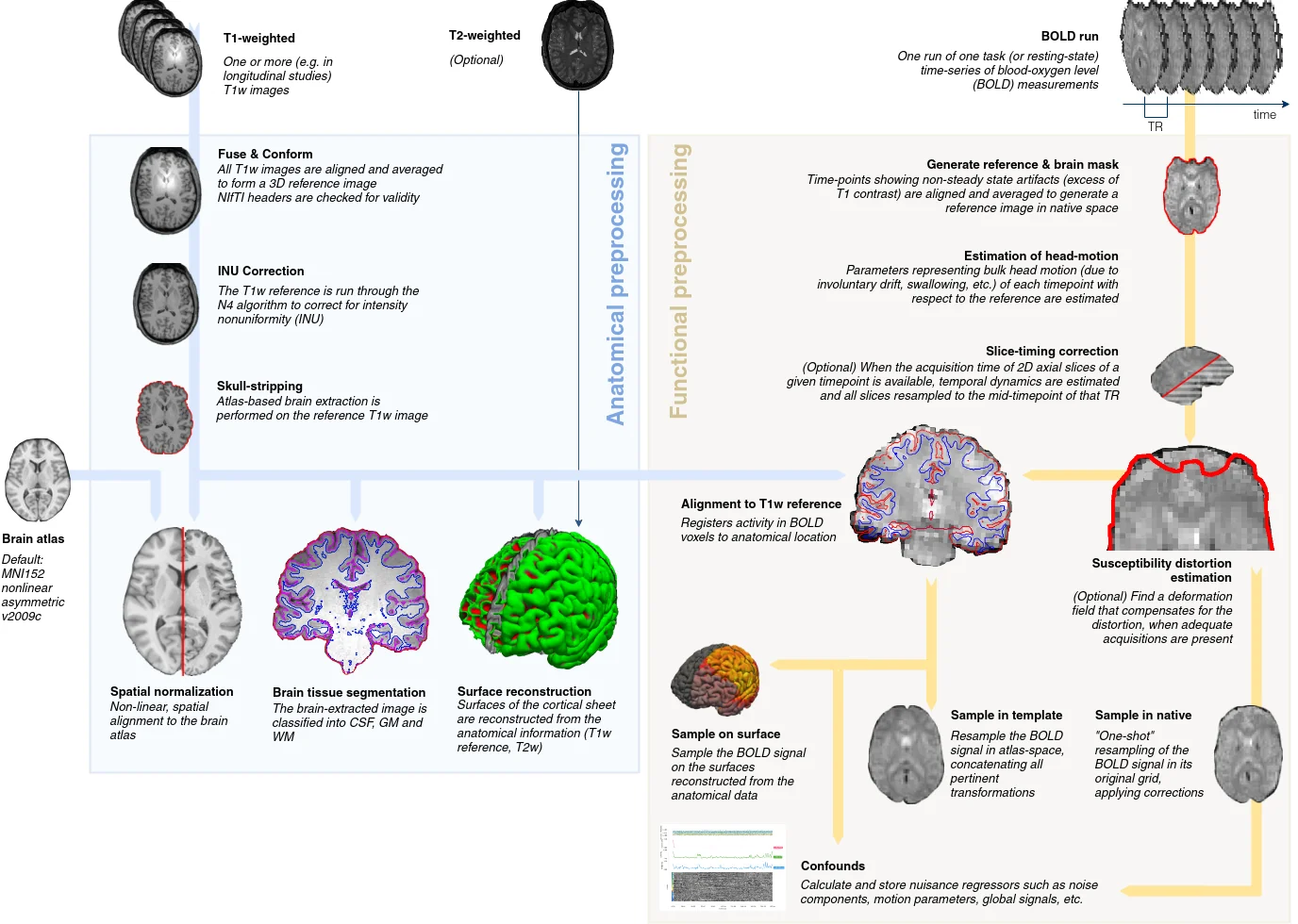
Throughout this lab and course, you have frequently heard about fmriprep, which is a functional magnetic resonance imaging (fMRI) data preprocessing pipeline that was developed by a team at the Center for Reproducible Research led by Russ Poldrack and Chris Gorgolewski. Fmriprep was designed to provide an easily accessible, state-of-the-art interface that is robust to variations in scan acquisition protocols, requires minimal user input, and provides easily interpretable and comprehensive error and output reporting. Fmriprep performs basic processing steps (coregistration, normalization, unwarping, noise component extraction, segmentation, skullstripping etc.) providing outputs that are ready for data analysis. fmriprep was built on top of nipype, which is a tool to build preprocessing pipelines in python using graphs. This provides a completely flexible way to create custom pipelines using any type of software while also facilitating easy parallelization of steps across the pipeline on high performance computing platforms. Nipype is completely flexible, but has a fairly steep learning curve and is best for researchers who have strong opinions about how they want to preprocess their data, or are working with nonstandard data that might require adjusting the preprocessing steps or parameters. In practice, most researchers typically use similar preprocessing steps and do not need to tweak the pipelines very often. In addition, many researchers do not fully understand how each preprocessing step will impact their results and would prefer if somebody else picked suitable defaults based on current best practices in the literature. The fmriprep pipeline uses a combination of tools from well-known software packages, including FSL, ANTs, FreeSurfer and AFNI. This pipeline was designed to provide the best software implementation for each stage of preprocessing, and is quickly being updated as methods evolve and bugs are discovered by a growing user base. This tool allows you to easily do the following:- Take fMRI data from raw to fully preprocessed form.
- Implement tools from different software packages.
- Achieve optimal data processing quality by using the best tools available.
- Generate preprocessing quality reports, with which the user can easily identify outliers.
- Receive verbose output concerning the stage of preprocessing for each subject, including meaningful errors.
- Automate and parallelize processing steps, which provides a significant speed-up from typical linear, manual processing.
- More information and documentation can be found at https://fmriprep.readthedocs.io/
Running fmriprep
Running fmriprep is a (mostly) trivial process of running a single line in the command line specifying a few choices and locations for the output data. One of the annoying things about older neuroimaging software that was developed by academics is that the packages were developed using many different development environments and on different operating systems (e.g., unix, windows, mac). It can be a nightmare getting some of these packages to install on more modern computing systems. As fmriprep uses many different packages, they have made it much easier to circumvent the time-consuming process of installing many different packages by releasing a docker container that contains everything you need to run the pipeline. If you're interested in running this on your local computer, here is the code you could use to run it in a jupyter notebook, or even better in the command line on a high performance computing environment.import os
base_dir = '/Users/lukechang/Dropbox/Dartbrains/Data'
data_path = os.path.join(base_dir, 'localizer')
output_path = os.path.join(base_dir, 'preproc')
work_path = os.path.join(base_dir, 'work')
sub = 'S01'
subs = [f'S{x:0>2d}' for x in range(10)]
for sub in subs:
!fmriprep-docker {data_path} {output_path} participant --participant_label sub-{sub} --write-graph --fs-no-reconall --notrack --fs-license-file ~/Dropbox/Dartbrains/License/license.txt --work-dir {work_path}
Quick primer on High Performance Computing
We could run fmriprep on our computer, but this could take a long time if we have a lot of participants. Because we have a limited amount of computational resources on our laptops (e.g., cpus, and memory), we would have to run each participant sequentially. For example, if we had 50 participants, it would take 50 times longer to run all participants than a single one. Imagine if you had 50 computers and ran each participant separate at the same time in parallel across all of the computers. This would allow us to run 50 participants in the same amount of time as a single participant. This is the basic idea behind high performance computing, which contains a cluster of many computers that have been installed in racks. Below is a picture of what Dartmouth's Discovery cluster looks like: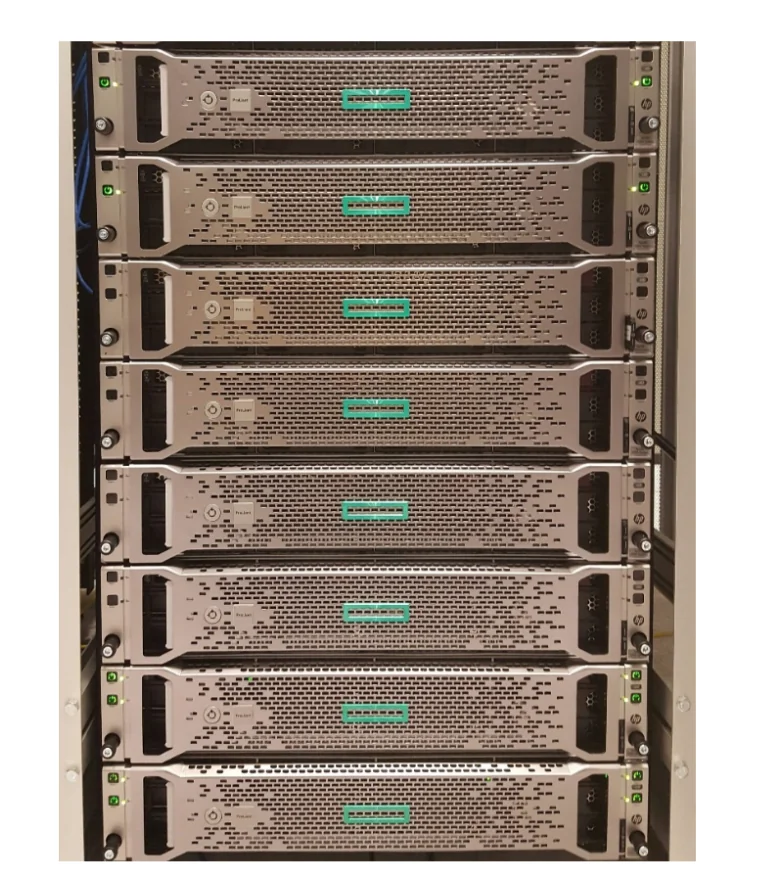 A cluster is simply a collection of nodes. A node can be thought of as an individual computer. Each node contains processors, which encompass multiple cores. Discovery contains 3000+ cores, which is certainly a lot more than your laptop!
In order to submit a job, you can create a Portable Batch System (PBS) script that sets up the parameters (e.g., how much time you want your script to run, specifying directory to run, etc) and submits your job to a queue.
NOTE: If you end up working in a lab in the future, you will likely need to request access to a system like discovery using this type of link.
For a detailed walkthrough of running fmriprep on Dartmouth's Discovery cluster — SLURM scripts, data access on Rolando, and environment setup — see the companion tutorial: Running fMRIPrep on HPC.
A cluster is simply a collection of nodes. A node can be thought of as an individual computer. Each node contains processors, which encompass multiple cores. Discovery contains 3000+ cores, which is certainly a lot more than your laptop!
In order to submit a job, you can create a Portable Batch System (PBS) script that sets up the parameters (e.g., how much time you want your script to run, specifying directory to run, etc) and submits your job to a queue.
NOTE: If you end up working in a lab in the future, you will likely need to request access to a system like discovery using this type of link.
For a detailed walkthrough of running fmriprep on Dartmouth's Discovery cluster — SLURM scripts, data access on Rolando, and environment setup — see the companion tutorial: Running fMRIPrep on HPC.fmriprep output
You can see a summary of the operations fmriprep performed by examining the.html files in the derivatives/fmriprep folder within the localizer data directory.
Spend some time looking at the outputs and feel free to examine multiple subjects. The HTML reports let you visually inspect each preprocessing step — brain extraction quality (red outline on T1), tissue segmentation maps, registration quality (hover to compare spaces), carpet plots showing signal quality over time, and motion traces with framewise displacement.
Limitations of fmriprep
In general, we recommend using this pipeline if you want a sensible default. Considerable thought has gone into selecting reasonable default parameters and selecting preprocessing steps based on best practices in the field (as determined by the developers). This is not necessarily the case for any of the default settings in any of the more conventional software packages (e.g., spm, fsl, afni, etc). However, there is an important tradeoff in using this tool. On the one hand, it's nice in that it is incredibly straightforward to use (one line of code!), has excellent documentation, and is actively being developed to fix bugs and improve the overall functionality. There is also a growing user base to ask questions. Neurostars is an excellent forum to post questions and learn from others. On the other hand, fmriprep is unfortunately in its current state not easily customizable. If you disagree with the developers about the order or specific preprocessing steps, it is very difficult to modify. Future versions will hopefully be more modular and easier to make custom pipelines. If you need this type of customizability we strongly recommend using nipype over fmriprep. In practice, it's always a little bit finicky to get everything set up on a particular system. Sometimes you might run into issues with a specific missing file like the freesurfer license even if you're not using it. You might also run into issues with the format of the data that might have some conflicts with the bids-validator. In our experience, there is always some frustration getting this to work, but it's very nice once it's done.Exercises
Exercise 1. Inspect HTML output of other participants.
For this exercise, you will need to navigate to the derivatives folder containing the fmriprep preprocessed data../data/localizer/derivatives/fmriprep and inspect the HTML output of subjects other than S01. Did the preprocessing steps work? Are there any issues with the data that we should be concerned about?